Tableau vs. Power BI vs. Looker: Which BI Tool is Best?
Advertisement
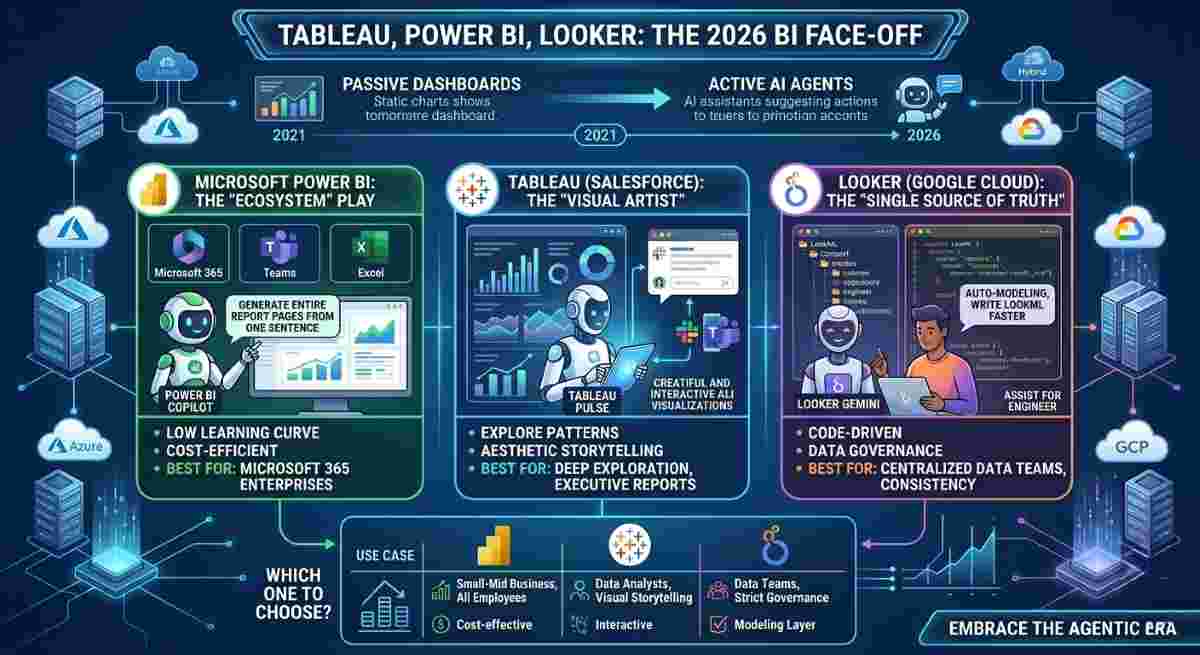
Choosing between Tableau, Power BI, and Looker depends on your existing technology stack, budget, and the technical literacy of your team. In 2026, these "Big Three" platforms have moved beyond standard dashboards into the era of Agentic Analytics, where AI agents suggest actions rather than just showing charts.
Quick Navigation: The 2026 BI Face-Off
- Core Philosophies: Different Tools for Different Minds
- Comparison Table: Features, Pricing, and Skill Levels
- AI Capabilities: The "Agentic" Era
- The Verdict: Which One Should You Choose?
- BI Tool Comparison FAQs
Core Philosophies: Different Tools for Different Minds
Each tool was built with a specific "ideal user" in mind, which dictates its core functionality today.
1. Power BI: The "Ecosystem" Play
Power BI is designed to be the natural evolution for Excel users. If your company lives in Teams, Azure, and Office 365, Power BI is essentially a "plug-and-play" solution. It prioritizes accessibility and cost-efficiency.
2. Tableau: The "Visual Artist"
Owned by Salesforce, Tableau remains the gold standard for Data Exploration. It is built for analysts who want to uncover hidden patterns by dragging and dropping elements. It values aesthetic beauty and high interactivity, making it the favorite for executive-level storytelling.
3. Looker: The "Single Source of Truth"
Looker (Google Cloud) is fundamentally different because it is code-driven. It uses a modeling layer called LookML. Instead of every user defining "Profit" differently, the data team defines it once in code, ensuring every report across the company is 100% consistent.
Comparison Table: Features, Pricing, and Skill Levels
| Feature | Microsoft Power BI | Tableau (Salesforce) | Looker (Google Cloud) |
|---|---|---|---|
| Best For | Microsoft 365 Ecosystem | Visual Storytelling | Data Governance |
| Learning Curve | Low (familiar for Excel users) | Moderate | High (requires SQL/LookML) |
| Pricing (Starting) | ~$14/user/month | ~$15 – $75/user/month | ~$66,600+/year (Base) |
| Primary Cloud | Azure | Hybrid (Any Cloud) | Google Cloud (GCP) |
| Skill Level | Beginner to Analyst | Analyst to Data Scientist | Data Engineer / Developer |
AI Capabilities: The "Agentic" Era
In 2026, the battleground has shifted to Agentic BI—where AI doesn't just draw charts but performs the analysis for you.
- Power BI Copilot: Now integrated deeply with Microsoft Fabric, it can generate entire report pages from a single sentence ("Create a dashboard showing our Q3 churn risk").
- Tableau Pulse: Uses AI to proactively push insights to you. Instead of looking at a dashboard, Tableau Pulse sends a message saying: "Sales are up 10%, mostly driven by the London region."
- Looker (Gemini Integration): Focuses on Auto-Modeling. It uses Google’s Gemini AI to help analysts write LookML code faster and suggests the best data relationships automatically.
The Verdict: Which One Should You Choose?
Choose Power BI if: You are a small-to-midsize business or a Microsoft enterprise. It is the most cost-effective way to get professional-grade analytics into the hands of every employee.
Choose Tableau if: You need deep exploratory analysis and highly interactive dashboards for executive storytelling.
Choose Looker if: You have a centralized data team and want strict data governance with a consistent single source of truth.
BI Tool Comparison FAQs
Can I use Tableau on top of a Microsoft SQL Server?
Yes. All three tools have 100+ connectors and can pull data from almost any source, including SQL Server, Snowflake, and BigQuery. However, native integrations such as Power BI with Azure often perform faster.
Is Looker Studio the same as Looker?
No. Looker Studio is a free visualization tool for quick dashboards. Looker is the enterprise-grade platform with a modeling layer and governance features.
Which tool is better for Big Data?
Looker and Tableau typically handle extremely large datasets efficiently. However, Power BI Premium with large-format models has become highly competitive for enterprise-scale workloads.
Advertisement