Doodle Review 2026: Pricing, Features, Pros & Cons
Advertisement
Doodle Review 2026: The Group Scheduling Tool That Ends the Back-and-Forth
Scheduling software has grown increasingly crowded, with calendar-integrated tools like Calendly and Acuity Scheduling capturing significant market share. Yet Doodle occupies a distinct position: it does not require participants to have an account, does not presuppose that everyone uses the same calendar system, and does not demand that invitees share their full calendar with the organizer. That friction-free approach to group coordination remains its defining competitive advantage in 2026.
1. What Is Doodle?
Doodle is a web-based scheduling platform built around the concept of group polling. Rather than requiring an organizer to find a mutually available slot themselves, Doodle distributes that task to all participants simultaneously. The organizer proposes a set of candidate times, sends a single link, and respondents mark which options work for them — with the optimal slot surfacing automatically based on collective responses.
- Group Polls: The core Doodle feature. Organizers propose multiple date and time options; participants indicate availability without needing a Doodle account, reducing friction to the absolute minimum.
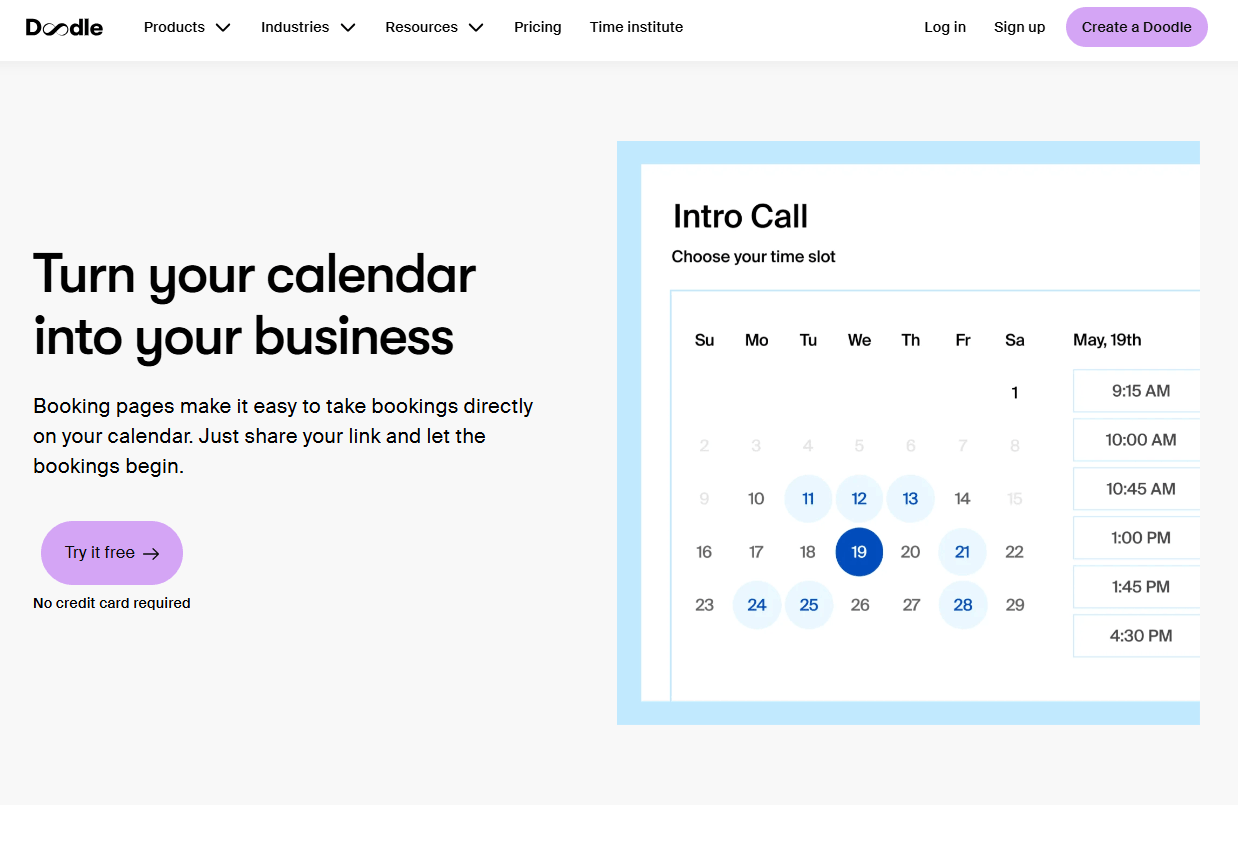
- 1-on-1 Booking Pages: For paid users, Doodle also functions as a traditional scheduling link — shareable booking pages that let contacts choose from your live calendar availability, similar to Calendly.
- Sign-Up Sheets: A structured way to assign time slots to specific participants, useful for interview schedules, parent-teacher conferences, or volunteer coordination.
- Calendar Integration: Connects with Google Calendar, Microsoft Outlook, and iCloud to display your real availability and prevent double-booking across both personal and professional calendars.
- Automatic Timezone Detection: Poll times are displayed in each respondent's local timezone automatically, eliminating the calculation errors that plague cross-regional scheduling.
2. How Much Does Doodle Cost?
Doodle offers three pricing tiers in 2026, ranging from a fully free entry point to a team-oriented plan with administrative controls. The free plan is functional for occasional users, though it carries some limitations that become noticeable under regular professional use.
- Free Plan: No cost, no account required for participants. Includes unlimited group polls with ad-supported pages. Suitable for personal use or infrequent scheduling needs where ad visibility on shared links is not a concern.
- Pro Plan: Starting at $6.95 per user per year (billed annually). Removes ads from all polls and booking pages, enables 1-on-1 booking links with calendar sync, adds automated reminders, and allows custom branding — essential for anyone sending Doodle links to clients or senior stakeholders.
- Team Plan: Starting at $8.95 per user per year (billed annually). Includes everything in Pro, plus centralized team administration, shared booking pages, round-robin meeting distribution, and analytics on booking activity across the team.
- Enterprise Plan: Custom pricing for organizations requiring SSO, advanced security controls, dedicated onboarding support, and SLA guarantees. Pricing is negotiated directly with Doodle's sales team based on organization size and requirements.
3. Pros of Doodle
Doodle's strengths are most visible when you look at how it removes barriers rather than adds features. The platform's design philosophy favors accessibility and speed over complexity, which translates into a set of genuine advantages for coordinators working with large or mixed groups.
- No account required for poll participants, which dramatically reduces the likelihood of non-responses and keeps group scheduling friction-free for respondents of any technical comfort level.
- Poll results are visible in real time, allowing organizers to identify the best slot as responses come in rather than waiting for full participation before reviewing availability.
- Automatic timezone adjustment means participants in different regions always see times in their local context, eliminating the manual conversion errors that cause scheduling failures across geographies.
- Calendar integration with Google, Outlook, and iCloud gives paid users a live view of their availability, preventing conflicts between Doodle bookings and existing commitments.
- The interface is minimal enough that first-time users can create and share a poll within minutes — no training, no documentation, no onboarding required.
- Automated email and SMS reminders on paid plans meaningfully reduce no-shows by prompting participants ahead of confirmed meetings without any manual follow-up from the organizer.
4. Cons of Doodle
Doodle's simplicity is also the source of its most common complaints. Users who grow into the platform for regular professional use frequently encounter limitations that require upgrading to resolve — or, in some cases, switching tools entirely.
- The free plan displays prominent advertising on all shared poll pages, which creates an unprofessional impression when links are sent to clients, executives, or external partners.
- Booking form customization is limited compared to competitors like Acuity Scheduling — organizers cannot add conditional logic, complex intake questions, or detailed pre-meeting instructions to their polls.
- Third-party integrations beyond calendar apps are narrow. There is no native CRM sync, limited Zapier depth on lower tiers, and no built-in payment collection for booking-based services.
- Reporting and analytics are available only on the Team plan, leaving Pro users with no data on booking trends, response rates, or participant engagement over time.
- The interface, while clean, has not undergone a significant visual redesign in several years and feels dated compared to newer scheduling tools with more polished UI treatments.
- Group poll management can become unwieldy for large respondent sets — there is no built-in way to share poll results with observers who are not themselves voting, which creates additional administrative steps for organizers.
5. Core Features of Doodle
Doodle's feature set is purpose-built around the coordination use case. Rather than attempting to replicate a full scheduling CRM, it focuses on doing group availability polling and individual booking exceptionally well, with a set of supporting features that serve the core workflow.
- Group Poll Creation: Propose multiple date and time options simultaneously and distribute a single shareable link that lets any number of participants mark their availability without creating an account.
- 1-on-1 Booking Pages (Pro+): Shareable personal booking links connected to your live calendar, allowing contacts to self-schedule based on your real-time availability.
- Sign-Up Sheets: Assign specific participants to specific time slots, useful for structured scheduling scenarios such as interview rounds, academic office hours, or shift sign-ups.
- Real-Time Availability View: Poll responses update instantly, giving organizers a live read of which times have the broadest support as respondents submit their choices.
- Automatic Timezone Detection: Each respondent sees poll times localized to their own timezone automatically, with no manual adjustment required by the organizer or participant.
- Calendar Sync: Two-way integration with Google Calendar, Microsoft Outlook, and iCloud ensures Doodle bookings respect existing commitments and update the connected calendar upon confirmation.
- Automated Reminders (Pro+): Scheduled email and SMS notifications sent to participants ahead of confirmed meetings, reducing no-show rates without manual follow-up.
- Custom Branding (Pro+): Replace Doodle's default branding on polls and booking pages with your own logo and color scheme for a professional, client-ready presentation.
- Ad-Free Polls (Pro+): Removes all advertising from shared poll pages, presenting a clean, distraction-free experience to every respondent.
- Round-Robin Scheduling (Team+): Distributes incoming bookings across team members based on availability, ensuring equitable workload spread without manual assignment.
- Team Admin Controls (Team+): Centralized management of team members' booking pages, availability rules, and scheduling preferences from a single administrative dashboard.
- Shared Booking Pages (Team+): Create a single booking link that routes to the appropriate available team member, useful for support queues, sales teams, or shared service pools.
- Analytics and Reporting (Team+): Track booking volumes, response rates, and scheduling patterns across the team to optimize availability and identify coordination bottlenecks.
- Mobile-Responsive Interface: All polls and booking pages render cleanly on smartphones and tablets, allowing participants to respond from any device without downloading an app.
- Zoom and Video Conferencing Integration: Automatically generate and attach video meeting links to confirmed bookings, eliminating the manual step of creating and sharing conference URLs.
6. Benefits of Using Doodle
Doodle's primary value is the time it saves coordinators who would otherwise spend hours negotiating availability through email chains, chat messages, or phone calls. The benefits below reflect what users across company sizes consistently report after integrating Doodle into their scheduling workflows.
- Eliminates Scheduling Back-and-Forth: A single poll link replaces an entire thread of availability emails. Organizers send one message and receive structured responses rather than managing a fragmented conversation across multiple replies.
- Zero Barrier for Participants: Because respondents do not need a Doodle account to participate, adoption is immediate regardless of whether invitees are internal colleagues, external clients, or community members with no prior exposure to the tool.
- Scales Effortlessly to Large Groups: Whether coordinating five colleagues or fifty community volunteers, the polling model handles large respondent sets without additional administrative complexity for the organizer.
- Reduces No-Shows Through Automation: Automated reminders on paid plans handle the follow-up communication that organizers would otherwise need to manage manually, improving attendance rates without added workload.
- Accurate Cross-Timezone Coordination: Automatic timezone localization prevents the calculation errors that frequently cause scheduling failures between participants in different cities or countries.
- Professional Presentation on Paid Plans: Removing ads and adding custom branding ensures that scheduling links sent to clients and executives reflect the organizer's professionalism rather than a free tool's limitations.
- Keeps Scheduling Separate from Calendar Sharing: Unlike tools that require participants to share their full calendar, Doodle only collects responses to proposed times — preserving privacy while still gathering the information needed to find a workable slot.
7. Our Expert Take on Doodle
Doodle occupies a genuinely useful niche in the scheduling software landscape, and it occupies it well. The polling model solves a real problem — finding a time that works across a group of people with different schedules, different calendar systems, and different levels of willingness to sign up for yet another platform — more elegantly than any alternative approach. The zero-friction experience for respondents is the product's clearest competitive advantage, and it is one that competitors who require account creation or calendar permission grants have consistently failed to match.
For occasional use or personal coordination, the free plan does what it promises. The advertising is noticeable but not crippling, and the core polling functionality is fully intact. The value calculation shifts significantly the moment you start sending Doodle links to clients, partners, or senior stakeholders — at which point the Pro plan's ad removal and custom branding become near-essential rather than optional upgrades.
Where Doodle shows its age most visibly is in the breadth of its ecosystem. Users who need booking intake forms with conditional logic, built-in payment collection, or deep CRM integration will find the platform's feature scope insufficient and will need to look at tools like Acuity Scheduling or Calendly's higher tiers instead. Doodle is not trying to be a full scheduling CRM — and that is not a flaw, but it is worth understanding before committing to a paid plan expecting capabilities the product does not offer.
Team plan users get meaningful additional value through round-robin routing and centralized admin controls, making Doodle a practical choice for small customer-facing teams that need to distribute inbound meeting requests without building a complex routing workflow. The analytics, while basic, give team managers enough visibility to identify scheduling bottlenecks and adjust availability rules accordingly.
Overall, Doodle in 2026 is the right tool when your primary need is coordinating group availability quickly and with minimum friction for respondents. It is the wrong tool when you need sophisticated intake forms, payment collection at booking, or a deeply integrated scheduling CRM. Know which problem you are solving, and Doodle will either be an obvious fit or an obvious pass.
8. What Business Types Use Doodle?
Doodle's use cases span industries and organization sizes. Its zero-friction participation model makes it particularly well-suited to scenarios where the organizer cannot guarantee that all participants will sign up for a dedicated scheduling platform.
- Corporate HR and Recruitment Teams: Hiring managers use Doodle to coordinate multi-interviewer panel schedules and candidate availability windows across departments, compressing what would otherwise be a multi-day email negotiation into a single link.
- Academic and Educational Institutions: Professors, academic advisors, and department coordinators rely on Doodle for office hour sign-ups, committee meeting scheduling, and student group coordination across varying class timetables.
- Healthcare and Allied Health Practices: Small clinics and therapy practices use Doodle to find mutually available slots for multi-participant case reviews, team briefings, and training sessions without exposing patient-facing booking systems to internal coordination traffic.
- Event Planners and Community Organizers: The group poll model is a natural fit for coordinating large groups of volunteers, vendors, or community members who do not share a common calendar system or employer.
- Consulting and Professional Services Firms: Consultants coordinating multi-stakeholder client workshops, discovery sessions, or steering committee meetings use Doodle to surface the optimal time across participants without requiring clients to share their calendar access.
- Sales and Business Development Teams: Account executives use the 1-on-1 booking page feature to share a single scheduling link with prospects, removing the back-and-forth from the meeting-booking stage of the sales process.
- Nonprofit Organizations: With limited administrative staff and diverse volunteer schedules, nonprofits find Doodle's free tier and no-account participation model a practical solution for board meetings, volunteer briefings, and donor engagement sessions.
The Final Verdict
Doodle earns its standing as the default recommendation for group scheduling because it does something rare in software: it removes a problem without introducing a new one. Participants do not need accounts. Organizers do not need to manually calculate timezones. The best available time slot surfaces on its own. For teams and individuals who spend meaningful time negotiating meeting logistics, the Pro plan pays for itself in the first week. For larger teams that need routing and reporting, the Team plan delivers structured coordination at a price point that remains accessible for small businesses. The limitations are real, but they are predictable — and understanding them upfront is what makes Doodle the right choice for the right use case.
Advertisement