How to Build Automated Document Approval Workflows in the Cloud
Advertisement
Automated document approval workflows in the cloud are digital sequences that use predefined business rules to route documents—such as contracts, invoices, or HR policies—through a series of review and sign-off stages without manual intervention. In 2026, these workflows are the backbone of the "distributed office," ensuring that critical decisions move forward regardless of where team members are located.
Quick Navigation:
Step 1: Mapping the Physical Process to Digital Logic
Step 2: Defining Conditional Routing and Approver Roles
Step 3: Integrating E-Signatures and Notification Loops
Step 4: Testing, Deployment, and Exception Handling
Leading Cloud Tools for Approval Automation
The Hybrid Alternative: When to Use Human-in-the-Loop
Step 1: Mapping the Physical Process to Digital Logic
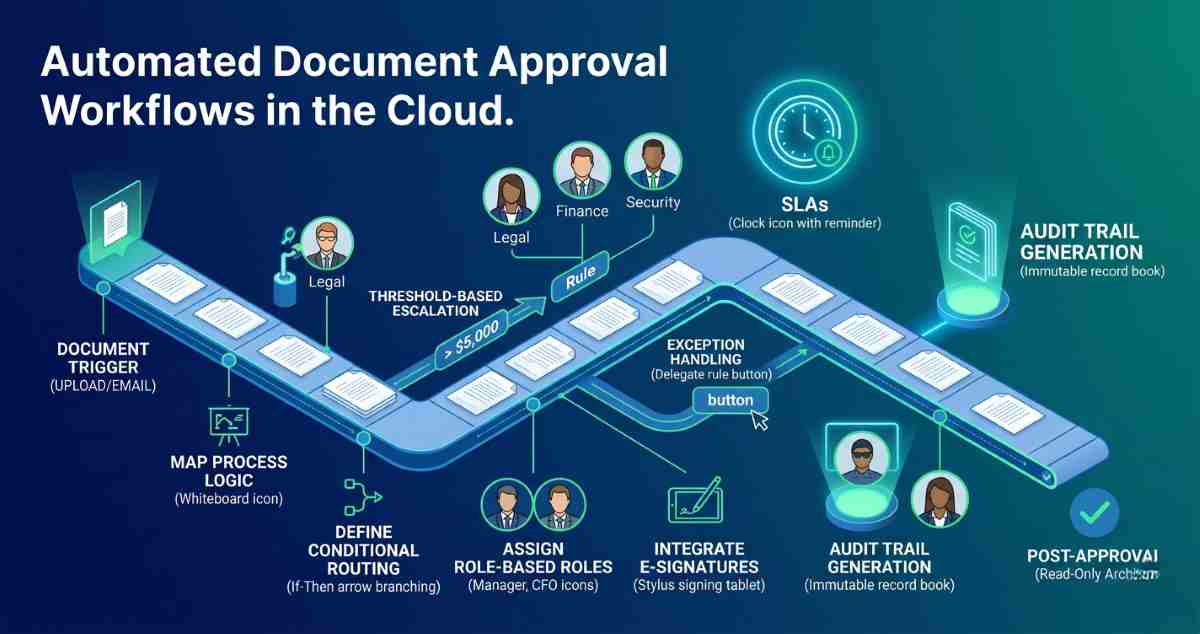
Before touching a software dashboard, you must translate your existing manual process into a logic-based flowchart. Automation fails when it attempts to digitize a broken or disorganized manual process.
Identify Document Triggers: Determine exactly what starts the workflow. Is it a new file upload to a specific cloud folder? Is it an email attachment received by the accounts payable alias?
Stakeholder Inventory: List every person or department that needs to touch the document. Differentiate between "Reviewers" (who provide feedback) and "Approvers" (who have the legal or financial authority to sign off).
Inventory of Data Points: Identify the metadata required to route the file. For an invoice, this includes the vendor name, total amount, and department code. For a contract, it includes the expiration date and liability limit.
Step 2: Defining Conditional Routing and Approver Roles
The power of cloud automation lies in conditional logic—the "if-then" rules that decide where a document goes next.
Sequential vs. Parallel Routing:
Sequential: Document moves to Person A, then Person B only after Person A approves. Use this for high-risk documents like legal contracts.
Parallel: Document is sent to the Legal, Finance, and Security teams simultaneously. This significantly reduces "wait time" bottlenecks.
Threshold-Based Escalation: Build rules based on value. For example: "If the invoice is < $5,000, route to Department Head. If > $5,000, route to CFO."
Role-Based Assignment: Never assign a workflow step to a specific name (e.g., "John Smith"). Assign it to a role (e.g., "Procurement Manager"). This ensures the workflow continues to function even during staff turnover or vacations.
Step 3: Integrating E-Signatures and Notification Loops
An approval is often legally incomplete without a verifiable signature. Modern cloud workflows integrate directly with e-signature providers to close the loop.
E-Signature Integration: Tools like Adobe Acrobat Sign or DocuSign should be embedded directly into the workflow. Once the final approver clicks "Approve," the system automatically triggers the signature request and attaches the certificate of completion to the final file.
Automated Reminders (SLAs): Human bottlenecks are the leading cause of workflow failure. Set Service Level Agreements (SLAs) for each step. If a document sits with an approver for more than 48 hours, the system should automatically send a reminder via Slack, Teams, or email.
Audit Trail Generation: Every action—who opened the file, when they approved it, and what comments they left—must be logged. In 2026, these audit trails are automatically converted into immutable records for compliance and tax audits.
Step 4: Testing, Deployment, and Exception Handling
No workflow is perfect on day one. You must account for the "Edge Cases"—the times when the standard rules don't apply.
Sandboxing: Build and test your workflow in a non-production environment using dummy documents. Verify that the "Reject" button actually routes the file back to the creator for revisions rather than just deleting it.
Exception Paths: What happens if the primary approver is out of the office? Build "Delegate" rules where the system automatically reassigns tasks to a backup after a specific period of inactivity.
The "Kill Switch": Ensure there is a way for an administrator to manually override or stop a stuck workflow without breaking the entire system.
Leading Cloud Tools for Approval Automation
Choosing a platform depends on your existing tech stack and the complexity of your logic.
Microsoft Power Automate: The gold standard for organizations already using SharePoint and Teams. It allows for deep integration with the entire Microsoft 365 ecosystem.
Nintex: A powerful, low-code platform designed for complex, cross-departmental enterprise workflows that require advanced logic and third-party integrations.
M-Files: Uses a metadata-driven approach where the document's properties (e.g., "Status: Pending") automatically trigger the next step in the lifecycle.
Kissflow: Excellent for SMBs looking for a visual, user-friendly interface to build simple internal approvals like expense reports or time-off requests.
Comparison of Workflow Capabilities
| Feature | Basic Cloud Storage | Advanced Cloud DMS |
|---|---|---|
| Routing | Manual sharing | Automated "If-Then" logic |
| Version Control | Conflict copies created | Unified version history |
| Notifications | Manual emails | Automated Slack/Teams alerts |
| Sign-offs | Typed names | Legally binding E-signatures |
| Compliance | User-managed | Automatic audit logs |
The Hybrid Alternative: When to Use Human-in-the-Loop
Despite the trend toward "Hyper-automation," some workflows require Human-in-the-Loop (HITL). Highly sensitive legal settlements or high-value mergers should never be "Auto-Approved" by a bot. In these cases, the cloud system handles the mundane tasks—gathering IDs, verifying signatures, and checking for missing fields—but stops at a hard gate where a human executive must review the summary before final execution. This hybrid approach offers the speed of the cloud with the safety of human oversight.
FAQs
1. Can I build workflows that involve people outside my organization (like clients)?
Yes. Most modern cloud DMS platforms allow for "Guest Access" or external portals. You can route a contract to a client for signature; they receive a secure link, sign the document, and the workflow automatically pulls the signed version back into your internal secure storage.
2. What happens to the document once it is finally approved?
A well-built workflow includes a "Post-Approval" phase. This typically involves moving the file to a "Final" archive folder, setting it to "Read-Only" to prevent further edits, and updating your ERP or CRM system to reflect that the document is complete.
3. Is it possible to automate the extraction of data from the document to help with routing?
Yes. By using AI and OCR (Optical Character Recognition), the system can "read" an uploaded document. For example, it can find the "Total Due" on an invoice and use that number to decide whether the document needs a Manager's or a Director's approval.
Advertisement