Cloud Storage vs. Document Management Software: What is the Exact Difference?
Advertisement
Cloud Storage vs Document Management System (DMS)
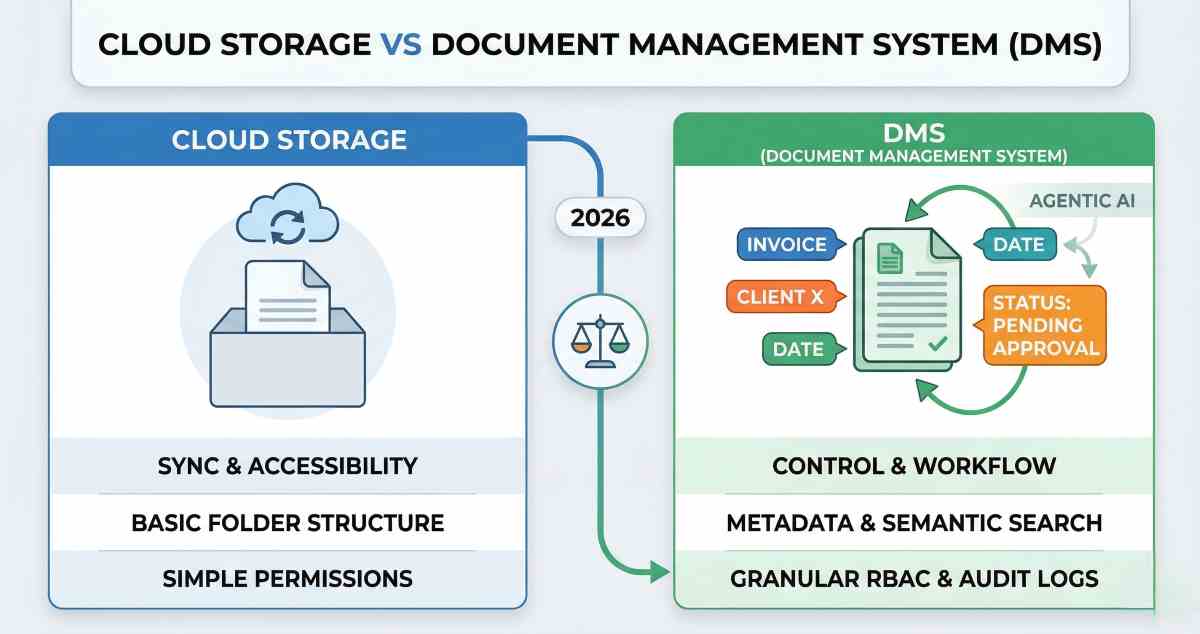
The exact difference between cloud storage and document management software (DMS) lies in their core objective: Cloud storage is designed for the electronic housing and syncing of files across devices, while a Document Management System is built to control the lifecycle, metadata, and workflow automation of those files. While cloud storage serves as a digital "hard drive in the sky," a DMS acts as a sophisticated "digital librarian" that understands the context, version history, and compliance requirements of every piece of data it holds.
Quick Navigation: Mapping the Digital Divide
Defining the Primary Intent: Storage vs. Management
The Functional Gap: Versioning and Metadata
Security and Compliance: Beyond Simple Permissions
Workflow Automation: Turning Static Files into Active Assets
Collaboration vs. Control: The User Experience Factor
Cost Analysis and ROI in 2026
DMS vs. Cloud Storage Comparison Table
Defining the Primary Intent: Storage vs. Management
In the 2026 enterprise landscape, the line between these two technologies is often blurred by marketing terminology, but the technical architecture remains distinct.
Cloud Storage (e.g., Google Drive, Dropbox, OneDrive) is a service model where data is transmitted and stored on remote storage systems. Its primary goal is availability. It ensures that if you upload a PDF in Chennai, you can open it on a mobile device in London. It excels at file synchronization, simple sharing, and basic folder hierarchies. However, it treats a file as a "blob" of data; it knows the filename and size, but it rarely understands the content or the business rules governing it.
Document Management Software (e.g., M-Files, Laserfiche, OpenText) is a framework used to track, manage, and store documents throughout their entire lifecycle. Its primary goal is control and process efficiency. A DMS utilizes a database-driven architecture where files are often "containerless." Instead of being tucked away in a folder named "Invoices 2026," a document is tagged with metadata (Vendor Name, Amount, Due Date, Project ID). This allows the system to surface the document regardless of its "location" based on its properties.
The Functional Gap: Versioning and Metadata
One of the most significant differences is how these systems handle Version Control. In a standard cloud storage environment, versioning is often a "best effort" backup. If two users edit a file simultaneously, the system may create a "conflicted copy" or simply overwrite the last save.
A DMS utilizes a "Check-in/Check-out" system. When an analyst opens a contract to edit it, the document is "locked" to other users. This prevents data fragmentation. Furthermore, a DMS maintains a granular history. You don’t just see that a file was "updated 2 hours ago"; you see exactly what was changed, by whom, and why, often accompanied by mandatory comments.
Metadata is the "secret sauce" of a DMS. While cloud storage relies on a rigid folder structure—which leads to "folder graveyard" syndrome where files are lost in deep sub-directories—a DMS uses semantic indexing. According to research on information architecture, metadata-driven systems reduce the time spent searching for information by up to 40% compared to traditional hierarchical folders. In 2026, many DMS platforms use Agentic AI to automatically scan an uploaded document, identify the "Contract Expiration Date," and set an automated reminder—a feat basic cloud storage cannot achieve.
Security and Compliance: Beyond Simple Permissions
Cloud storage security is usually restricted to "Read," "Write," or "Owner" permissions. While sufficient for personal use or small teams, it fails the rigorous standards of highly regulated industries like Finance or Healthcare.
A DMS provides Role-Based Access Control (RBAC) and Attribute-Based Access Control (ABAC). This means access can be granted not just based on who you are, but where you are, what device you are using, and the sensitivity of the document's metadata. For example, a DMS can automatically hide the "Salary" column of a spreadsheet from everyone except the HR Manager, even if the file is shared with the whole department.
Furthermore, a DMS is built for Audit Readiness. It creates immutable logs that track every single action taken on a document—viewing, printing, downloading, or emailing. This level of transparency is a requirement for ISO 27001 compliance and GDPR data sovereignty rules. Cloud storage, by contrast, rarely provides a legally defensible audit trail of who viewed a file without editing it.
Workflow Automation: Turning Static Files into Active Assets
This is where the ROI of a DMS truly diverges from cloud storage. Cloud storage is a passive repository; it sits and waits for you to interact with it. A DMS is an active participant in business processes.
In 2026, DMS platforms integrate automated workflows. When a "New Vendor Agreement" is uploaded, the DMS doesn't just store it. It identifies that the document is a contract, checks the vendor's insurance status in a linked CRM, and routes the document to the Legal Team for review. If Legal doesn't respond in 48 hours, the system automatically escalates the task to the General Counsel.
Cloud storage requires "human middleware"—a person to remember to send the email, follow up, and move the file to the "Approved" folder. By removing this manual friction, a DMS allows organizations to scale their operations without a linear increase in administrative headcount.
Collaboration vs. Control: The User Experience Factor
It is important to note that cloud storage often feels "faster" and more "intuitive" for creative collaboration. For drafting a blog post or sharing vacation photos, the friction-free nature of Google Drive is superior. It allows for "chaotic" real-time editing which is great for brainstorming.
However, "chaotic" is the enemy of enterprise governance. A DMS sacrifices some of that "friction-free" feel for referential integrity. In a DMS, you are guaranteed that the document you are looking at is the "Single Source of Truth." There are no "v2_FINAL_final_v3" filenames. There is only the document, and the system manages its evolution.
Cost Analysis and ROI in 2026
Cloud storage is generally billed by the Gigabyte (GB) or Terabyte (TB). It is a commodity service. A DMS is typically billed by the user or by the volume of automated transactions or workflows.
- Cloud Storage ROI: Found in lower IT infrastructure costs (retiring on-premise servers).
- DMS ROI: Found in labor productivity. If a $60 per hour employee saves 3 hours a week searching for documents or manually routing approvals, the DMS pays for itself within months. According to Gartner's latest 2026 Content Services report, organizations utilizing automated document lifecycle management see a 25% improvement in operational speed.
DMS vs. Cloud Storage Comparison Table
| Feature | Cloud Storage | Document Management (DMS) |
|---|---|---|
| Primary Goal | Sync and Accessibility | Control and Workflow |
| Search Method | Keywords and Filenames | Metadata and Semantic AI |
| Versioning | Basic or Conflict Copies | Check-in and Check-out |
| Security | Simple Folder Permissions | Granular RBAC and Audit Logs |
| Automation | None | Native Workflow Engine |
| Compliance | Minimal | High (HIPAA, GDPR, ISO) |
[Image 1: A diagram showing a file in Cloud Storage as a simple box vs. a file in a DMS surrounded by metadata tags and workflow arrows]
FAQs
Can I turn my Cloud Storage into a DMS using third-party apps?
While you can add tools like Zapier to automate some folder movements, you cannot easily replicate the deep metadata architecture or the immutable audit trails of a native DMS. It's often more expensive to patch cloud storage than to implement a purpose-built DMS.
Is a DMS too complex for a small business?
In 2026, many DMS-lite solutions exist for small teams. If your business handles high-value contracts, patient data, or complex project engineering files, the complexity of a DMS is a necessary safeguard against the much larger risk of data loss or compliance fines.
What is the difference between "Retention" in Cloud Storage and a DMS?
Cloud storage retention usually means do not delete this file for 5 years. DMS retention is smarter; it can say delete this document 7 years after the Contract End Date metadata field passes, ensuring you do not keep data longer than legally allowed.
Advertisement