How to Calculate the ROI of Going Paperless with Cloud Document Software
Advertisement
The ROI of going paperless with cloud document software is a financial metric that compares the net savings generated by eliminating physical document storage and manual routing against the total cost of implementing a digital Document Management System (DMS).
Quick Navigation:
How to Measure the Direct Financial Drain of Physical Paper
How to Quantify Productivity and Indirect Savings
The 4-Step Workflow to Calculate Your Exact ROI
Cloud Document Software Tools for the Transition
The Hybrid Alternative: When Full Paperless Fails
Case Study and Expert Insights
How to Measure the Direct Financial Drain of Physical Paper
Physical paper creates measurable, recurring expenses that drain enterprise budgets. To build an accurate business case, organizations must audit four specific cost centers.
Commercial Real Estate Costs: Standard filing cabinets consume roughly 17 square feet of office space. In premium commercial real estate markets, this floor space costs thousands of dollars annually. Transitioning to a cloud DMS reclaims this square footage for revenue-generating activities or allows companies to downsize their lease requirements.
Consumable Expenses: Printer leases, toner cartridges, specialized paper, and hardware maintenance contracts form a massive baseline expense. Routine printing costs compound quickly when accounting for misprints and duplicated copies.
Off-Site Storage Fees: Regulated industries require physical backups. Facilities like Iron Mountain charge monthly retention fees and distinct retrieval fees for archived boxes. Delivery fees for retrieving a specific physical box add unpredictable spikes to operational budgets.
Secure Destruction: Privacy laws mandate the secure shredding of sensitive documents. Outsourced shredding services add a fixed monthly operational cost to ensure regulatory compliance.
Key Takeaway: Eliminate these hard costs first. The immediate budget relief from canceling off-site storage and printer leases often covers the initial licensing fees of a cloud DMS within the first six months.
How to Quantify Productivity and Indirect Savings
The most substantial financial gain from cloud document software comes from human capital optimization. Employees waste highly compensated hours managing physical information.
Search and Retrieval Metrics: Research from the Association for Intelligent Information Management shows workers spend up to 20 percent of their week searching for misplaced information. A cloud DMS utilizes optical character recognition (OCR) and metadata, reducing retrieval time from minutes to seconds.
Workflow Velocity: Physical document routing requires manual hand-offs. A contract waiting on a desk creates a bottleneck. Cloud software uses automated routing. An invoice is uploaded, the system identifies the vendor, and it instantly notifies the correct manager for approval.
Version Control Accuracy: Working on outdated physical documents leads to costly rework. Cloud platforms enforce strict check-in and check-out protocols, ensuring all stakeholders view the single source of truth.
Remote Work Enablement: Physical paper traps data inside a specific geographic location. Cloud document software allows remote teams to access secure files instantly from any approved device. This eliminates courier fees and project delays caused by out-of-office personnel.
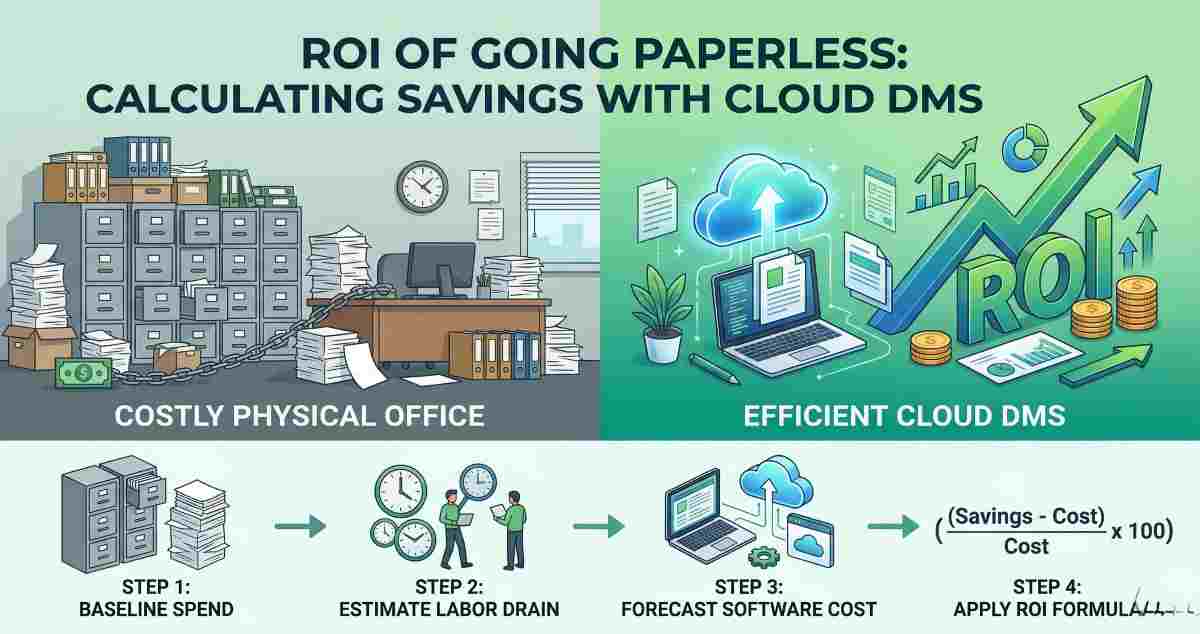
The 4-Step Workflow to Calculate Your Exact ROI
Use this practical workflow to determine the precise financial impact for your organization. Provide these concrete numbers to leadership to secure project approval.
Step 1: Baseline Your Current Spend
Pull 12 months of invoices for all paper-related services. Add the square footage cost of your file rooms. Calculate the total hard cost.
Step 2: Estimate the Labor Drain
Conduct a time audit. Ask team members to track hours spent filing, retrieving, and recreating lost documents over two weeks. Multiply those hours by the average hourly wage of your staff. For example, if ten employees save three hours a week at $30 an hour, the labor savings equal $46,800 annually.
Step 3: Forecast the Software Cost
Identify the Total Cost of Ownership (TCO) for the cloud document software. Include licensing fees, implementation costs, data migration, and initial user training. Do not look only at the monthly software subscription fee.
Step 4: Apply the ROI Formula
Use the standard financial equation.
ROI = ((Direct Savings + Labor Savings) - TCO) / TCO x 100
Cloud Document Software Tools for the Transition
Selecting the right infrastructure dictates the success of the transition. Avoid basic cloud storage drops and choose platforms built for process automation.
M-Files: Excels at metadata-driven architecture. It organizes files by what they are rather than where they are stored. This structure is highly useful for audit trails.
DocuWare: Provides strong out-of-the-box workflows for invoice processing and human resources onboarding. It specializes in capturing data from scanned physical documents.
Laserfiche: Ideal for highly regulated sectors requiring strict compliance and automated data retention policies. It includes robust records management features.
Cost Comparison Profile
| Expense Category | Physical Office | Cloud DMS Environment |
|---|---|---|
| Document Storage | High (Real estate and off-site fees) | Low (Included in software license) |
| Search Velocity | Slow (Manual filing and sorting) | Instant (Metadata and AI search) |
| Disaster Recovery | High Risk (Fire and flood vulnerability) | Low Risk (Geo-redundant cloud backups) |
The Hybrid Alternative: When Full Paperless Fails
Some business processes still demand physical signatures or hard-copy legally binding documents. In these scenarios, the hybrid alternative is the pragmatic solution.
Rather than digitizing every historical archive immediately, organizations digitize only active files. Legacy files remain in physical storage until they hit their natural destruction date. This strategy prevents the massive upfront cost of back-scanning decades of paperwork while still modernizing current operations. It is a targeted approach that maximizes ROI without disrupting compliance workflows.
Case Study and Expert Insights
Theoretical formulas require real-world validation.
"Before moving to a cloud DMS, our accounts payable team spent three days a week chasing down physical delivery receipts and matching them to invoices," states Sarah Jenkins, CFO of a regional logistics firm. "By implementing automated capture and digital workflows, we reduced processing time by 75 percent. We reassigned two clerks to data analysis roles, yielding a positive ROI in just eight months."
[Reddit Screenshot: Small business owner on a finance subreddit discussing how digitizing their back office saved them $1,200 a month in administrative costs]
Industry analysts stress that the transition must prioritize security alongside savings.
"The mistake companies make is treating a cloud DMS like a digital dumping ground," notes enterprise architect Marcus Thorne. "If you do not enforce metadata tagging and access controls on day one, you simply transition from a physical mess to a digital mess. The true ROI unlocks only when the data is structured and governed properly."
[CTA Image placeholder: "Ready to eliminate paper waste? Start your 30-day free trial of our automated cloud document software."]
FAQs
How long does it take to see a positive ROI when going paperless?
Most mid-sized organizations achieve a break-even point within 6 to 12 months of full implementation. The ROI accelerates in years two and three as legacy physical storage is phased out completely and automated workflows become standard practice.
Does going paperless really save money if we still need to print occasionally?
Yes. Even a "paper-light" office yields high ROI. The goal is not the total elimination of paper but the elimination of paper as the primary method for storage, search, and collaboration. Reducing print volume by 80 percent still generates massive savings.
What are the hidden costs of cloud document software?
Common overlooked costs include employee training, data migration from old network drives, and potential integration fees with existing software like ERPs. However, these are typically one-time costs compared to the recurring, compounding expenses of physical paper.
Advertisement