What is a Document Management System (DMS)? (Definition, Key Features, and Benefits Explained)
Advertisement
What is a Document Management System (DMS)? (Definition, Key Features, and Benefits Explained)
Meta Description: Master the essentials of Document Management Systems (DMS) in 2026. Learn how agentic AI and automated workflows transform document storage into strategic assets.
Inside This Guide
What is a Document Management System?
The 2026 Shift: From Storage to Agentic AI
How a DMS Works: The Technical Lifecycle
Key Features of a Modern DMS
6 Business Benefits of Implementing a DMS
Wildcard Option: Decentralized & Open-Source DMS
DMS Selection Checklist
Frequently Asked Questions
What is a Document Management System?
A Document Management System (DMS) is a specialized software solution designed to receive, track, manage, and store electronic documents while significantly reducing the reliance on physical paper. At its core, a DMS acts as a centralized digital repository that ensures information is not only archived but is also instantly retrievable, version-controlled, and governed by strict security protocols. Unlike basic cloud storage (which simply "holds" files), a DMS manages the entire lifecycle of a document—from initial capture and indexing to long-term retention and eventual disposal.
The 2026 Shift: From Storage to Agentic AI
As of early 2026, the document management landscape has evolved beyond static organization. We have entered the era of Agentic AI, where a DMS is no longer a passive "filing cabinet" but an active participant in business operations. According to recent market analysis reports from March 2026, the global agentic AI sector is projected to reach $139 billion by 2034, driven largely by enterprise demand for intelligent document handling.
In 2026, a "modern" DMS utilizes autonomous AI agents that "reason" rather than just "extract." Instead of a human manually tagging an invoice, an AI agent identifies the vendor, cross-references it with an existing contract, checks for price discrepancies, and queues it for approval automatically. This shift toward "digital assembly lines" allows organizations to move from reacting to document-heavy tasks to anticipating them.
How a DMS Works: The Technical Lifecycle
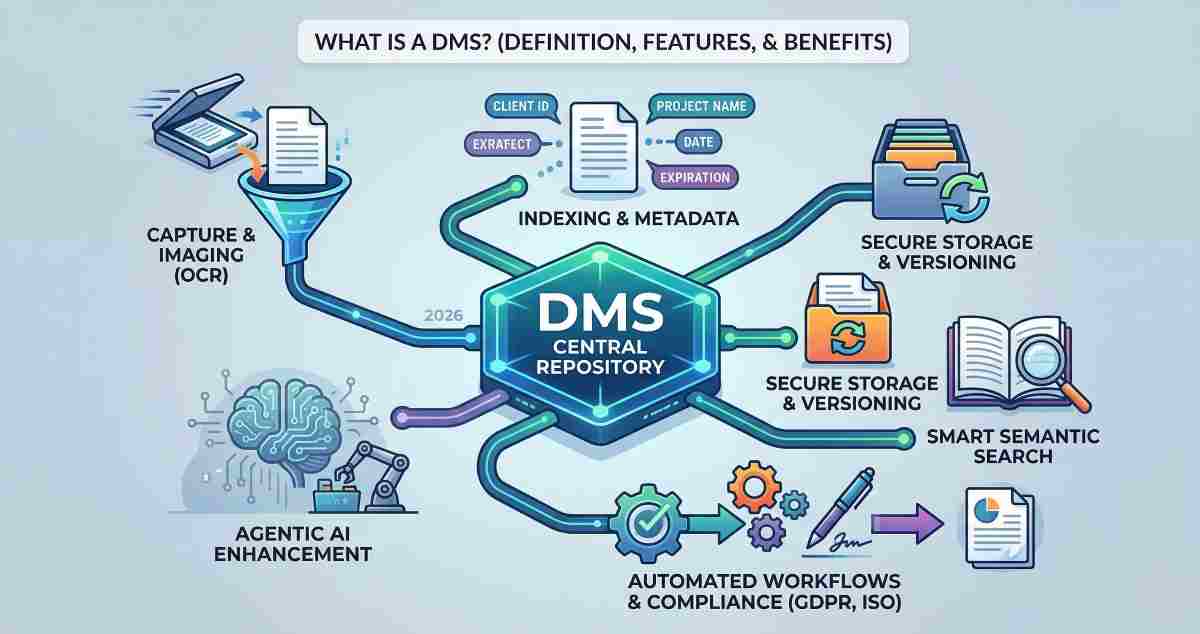
To understand the value of a DMS, you must look at how it handles a document’s "journey" through your organization. This process is typically broken down into four distinct phases:
- Capture and Imaging: This involves converting physical paper into digital formats via high-speed scanners and Optical Character Recognition (OCR). Modern systems can even "capture" data directly from emails, web forms, and mobile uploads.
- Indexing and Metadata: Once captured, the document is assigned "metadata"—descriptive tags like "Project ID," "Expiration Date," or "Client Name." This indexing makes the document searchable by more than just its filename.
- Storage and Versioning: The document is stored in a secure database (Cloud-native or On-premises). The Versioning feature ensures that if five people edit a proposal, the system tracks every change, allowing users to roll back to a "Clean Version" if an error occurs.
- Retrieval and Workflow: Using natural language search, a user can find a document in seconds. From there, the DMS triggers a Workflow, such as routing a legal contract to three different departments for a digital signature.
Key Features of a Modern DMS
When evaluating software, look for these five "non-negotiable" features that define enterprise-grade document management:
- Role-Based Access Control (RBAC): Security is paramount. RBAC ensures that a junior analyst cannot access sensitive payroll documents while the HR Manager has full visibility. This aligns with NIST SP 800-95 guidelines for secure web services.
- Audit Trails: An audit trail provides a permanent, unalterable log of who viewed, edited, or shared a document and at what time. This is critical for meeting ISO 12651-2 standards for information governance.
- Smart Search (Semantic Search): Traditional search looks for keywords. Smart search understands context. If you search for "unpaid bills," the system understands you are looking for "overdue invoices" even if the word "bill" isn't present.
- API Integration: A DMS must talk to your other tools. Whether it’s an ERP system or a CRM platform, a "Document Hub" should act as the single source of truth for all software.
- Automated Retention Policies: To remain compliant with regulations like GDPR or HIPAA, certain documents must be deleted after 7 years. A DMS automates this "disposition" process, reducing legal liability.
6 Business Benefits of Implementing a DMS
Implementing a robust DMS is not just about "going paperless"—it is a strategic move to improve the bottom line.
- Massive Productivity Gains: According to industry benchmarks, implementing automated document workflows can reduce processing times by 50% to 70%. Employees no longer waste 20% of their day searching for lost files.
- Enhanced Security and Compliance: With end-to-end encryption and detailed access logs, a DMS helps organizations survive audits with ease. It prevents the "data leakage" that occurs when sensitive files are shared via unencrypted email.
- Reduced Operational Costs: By eliminating the need for physical file cabinets, off-site storage, and excessive printing, companies can halve their cost-per-document.
- Seamless Collaboration: In a hybrid work environment, a DMS allows teams in Chennai, London, and New York to work on the same document simultaneously without "version chaos."
- Better Disaster Recovery: Physical documents are vulnerable to fire and floods. A cloud-based DMS ensures your business "ground truth" is backed up across multiple geographic zones.
- Predictive Analytics: Advanced systems can now analyze your document library to find trends. For example, a DMS could flag that 15% of your supplier contracts are missing a specific "Force Majeure" clause required by new 2026 regulations.
Wildcard Option: Decentralized & Open-Source DMS
While most enterprises flock to major players like Microsoft 365 or OpenText, there is a growing movement toward Decentralized DMS (dDMS) using blockchain-like architectures. These systems (such as LogicalDOC or OpenKM) provide a "Wildcard" advantage for organizations that require absolute data sovereignty. By using a decentralized model, there is no single point of failure, and "Immutable Proof of Existence" is baked into every document, making it impossible for a document to be altered without detection—even by a system administrator.
DMS Selection Checklist
- Can it handle my specific file types? (e.g., CAD drawings, high-bitrate video, or legacy TIFF images).
- Does it offer "Offline Access"? (Critical for field workers or those in low-connectivity areas).
- What is the "Time to Value"? (How long does it take to migrate your current 10TB of data into the new system?).
Frequently Asked Questions
What is the difference between a DMS and a CMS (Content Management System)?
A DMS is designed for structured "office" documents (PDFs, Word docs, Spreadsheets) with a focus on compliance and security. A CMS (like WordPress) is designed for publishing "web content" like blogs and landing pages for public consumption.
Can a DMS help with OCR (Optical Character Recognition)?
Yes. Most modern DMS platforms have built-in OCR engines that automatically turn a scanned image of a receipt into a text-searchable PDF. In 2026, these engines use "Spatial AI" to understand the layout of a document, correctly identifying which numbers are the "Total" and which are the "Date."
Is a Document Management System secure enough for the legal industry?
Absolutely. Specialized "Legal DMS" platforms are the gold standard for law firms. They provide "ethical walls" (preventing certain lawyers from seeing specific cases) and integrate directly with court filing systems to maintain a verified chain of custody.
Advertisement