Digital Signatures vs. Electronic Signatures: What is the Exact Difference?
Advertisement
In the realm of digital transformation, few terms are mangled as frequently as "Electronic Signature" and "Digital Signature." To the layperson, they sound like synonyms. To the IT architect or legal counsel, they represent two entirely different layers of the security stack. Understanding the nuance isn't just a matter of semantics—it’s about ensuring that your multi-million dollar contracts are legally defensible and your sensitive data remains untampered.
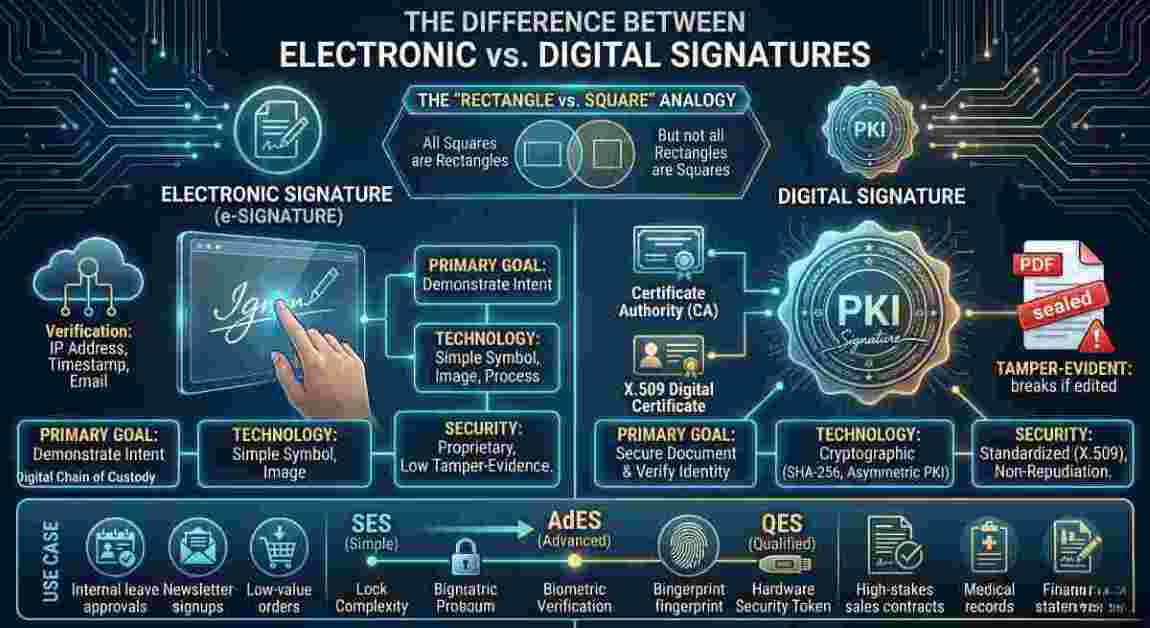
Think of it as the "Rectangle vs. Square" problem: Every digital signature is an electronic signature, but not every electronic signature is a digital signature.
The Electronic Signature: The "What" (Legal Intent)
An Electronic Signature (e-signature) is a broad, legal category. According to the US Federal ESIGN Act, it is defined as an "electronic sound, symbol, or process attached to or logically associated with a contract or other record and executed or adopted by a person with the intent to sign the record."
In simpler terms, an electronic signature is the digital version of a "wet-ink" signature. Its primary purpose is to demonstrate intent. When you check a box that says "I agree to these terms," or you type your name at the bottom of an email, or you draw your initials on a touch-screen with your finger, you are creating an electronic signature.
Characteristics of a standard e-signature:
- Focus: It is primarily concerned with the act of signing.
- Verification: Usually relies on simple identifiers like an email address, an IP address, or a timestamp.
- Tamper-Evidence: Very low. If you sign a PDF with a simple image of your signature, there is often no inherent technical barrier preventing someone from changing the text of the contract after the fact.
- Regulation: Governed by laws like the ESIGN Act and UETA in the US, or the "Simple" tier of eIDAS in the EU.
The Digital Signature: The "How" (Cryptographic Proof)
A Digital Signature is the technical implementation that makes an electronic signature secure. While the e-signature represents the "intent," the digital signature provides the evidence and the integrity. It is a mathematical technique used to validate the authenticity and integrity of a message, software, or digital document.
Digital signatures are built on Public Key Infrastructure (PKI). When you apply a digital signature, the software creates a unique "fingerprint" (called a hash) of the document and encrypts it using your private key.
Characteristics of a digital signature:
- Focus: It is concerned with the security and integrity of the data.
- Verification: Relies on a Certificate Authority (CA)—a trusted third party that verifies your identity and issues a digital certificate.
- Tamper-Evidence: Absolute. If even a single pixel or character in the document is changed after the signature is applied, the hash will no longer match, and the signature will be flagged as "Invalid" or "Tampered."
- Non-Repudiation: Because the signature is tied to a unique private key and verified by a CA, the signer cannot easily claim they didn't sign it in a court of law.
The Technical Deep Dive: How the Hash Works
To understand why digital signatures are superior for high-stakes enterprise workflows, we have to look at the "wizardry" under the hood. The process relies on asymmetric cryptography.
- Hashing: When you click "sign," the software uses a hashing algorithm (like SHA-256) to create a unique fixed-length string of characters representing the document's content.
- Encryption: Your Private Key encrypts this hash. This encrypted hash, along with your Public Key, is bundled into the digital signature.
- The Seal: The document is sent to the recipient.
- Decryption & Comparison: The recipient's software uses your Public Key to decrypt the hash. It then runs the same hashing algorithm on the document it received.
- The Result: If the hash generated by the recipient matches the decrypted hash from the sender, the document is authentic. If there is a 1-bit difference, the match fails.
To put this into perspective for the sysadmins and security architects, we aren't just talking about a simple MD5 hash. Modern digital signatures leverage SHA-256 or SHA-384 for the hashing phase, combined with RSA-2048 or Elliptic Curve Digital Signature Algorithm (ECDSA) for the encryption layer. When your PKI infrastructure is properly configured, the computational power required to brute-force or spoof this cryptographic seal would take the world's fastest supercomputers millions of years. This is why enterprise-grade APIs for modern signature platforms integrate directly with Hardware Security Modules (HSMs) on the backend—ensuring the private keys generating these hashes are physically isolated from network-level attacks.
Comparing the Tiers: SES vs. AdES vs. QES
In 2026, global standards (especially in the EU and emerging markets) have categorized these differences into three distinct tiers of "Electronic Signatures."
- Simple Electronic Signature (SES): This is the basic e-signature. No encryption is required. It’s a "Yes" or "No" intent.
- Advanced Electronic Signature (AdES): This must be a digital signature. It must be uniquely linked to the signer, capable of identifying the signer, and created using data that the signer can use under their sole control.
- Qualified Electronic Signature (QES): The highest level of security. This is a digital signature created by a Qualified Signature Creation Device (QSCD) and based on a qualified certificate issued by a regulated CA. In many countries, this is the only digital format that carries the exact same legal weight as a notarized handwritten signature. From a systems architecture standpoint, implementing QES means your tech stack must interface directly with a recognized Trust Service Provider (TSP) via robust API endpoints. You aren't just validating a document; you are executing a synchronous cryptographic handshake with a strictly audited external server.
Which One Should You Use?
For a tech-forward organization, the choice depends on the level of risk associated with the document.
- Use Simple E-Signatures for: Internal leave approvals, low-value purchase orders, or newsletter opt-ins.
- Use Digital Signatures for: Sales contracts, NDAs, HIPAA-compliant medical records, financial statements, and any document that may face a legal challenge in the future.
By using a digital signature, you aren't just getting a "picture" of a signature; you are getting a cryptographic envelope that protects your business from fraud and forgery.
| Feature | Electronic Signature | Digital Signature |
|---|---|---|
| Primary Goal | Demonstrate intent to sign | Secure document and verify identity |
| Technology | Symbol, image, or process | PKI (Public Key Infrastructure) |
| Security Standard | Proprietary to the vendor | Standardized (X.509) |
| Verification | Often difficult to verify years later | Independent verification via Certificate Authority |
| Tamper Protection | None inherent to the signature | Cryptographic seal breaks if edited |
| Legal Standing | Legally binding in most cases | Superior legal standing (Non-repudiation) |
FAQs
Technically, most modern e-signature platforms (like DocuSign or Adobe Acrobat Sign) include digital signature technology in their standard paid plans. The "cost" isn't in the software, but in the identity verification process. If you require a "Qualified" digital signature (QES), you may pay more because it involves a third-party identity check (often via video or physical ID).
Not exactly. You can overlay an image of your signature on a document that is then digitally signed by a platform. The image is for human eyes; the digital signature is the invisible cryptographic layer that actually protects the document. Without that layer, the scanned image is just a picture that anyone can copy and paste onto another file.
If a Private Key is compromised, any document signed with it is technically "authorized" by you. This is why professional digital signature platforms use Hardware Security Modules (HSM) or encrypted cloud vaults to store keys. If a key is stolen, it must be "revoked" through the Certificate Authority, rendering any future signatures with that key invalid.
Friction. The more secure the signature, the more steps required for the signer (like providing a passport scan or using a hardware token). For many B2C transactions, companies prefer the lower friction of a "Simple" e-signature to ensure the customer completes the transaction quickly.
Advertisement