A Step-by-Step Guide to a Successful ERP Implementation Without Downtime
Advertisement
Learn how to execute a successful ERP implementation without downtime in 2026. Master the parallel rollout strategy, data migration shadowing, and change management for a seamless transition.
A Step-by-Step Guide to a Successful ERP Implementation Without Downtime
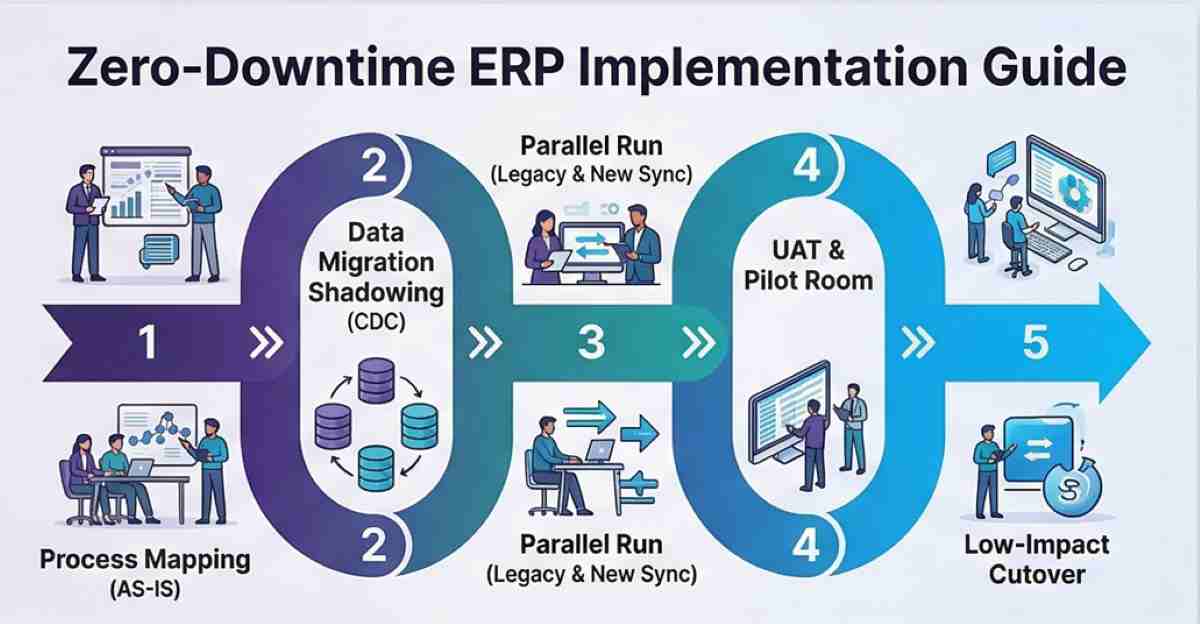
An ERP implementation is the high-stakes process of transitioning an organization’s core business functions—finance, supply chain, HR, and operations—into a unified, central software architecture. For modern enterprises, the "Big Bang" approach (shutting down the old system and flicking a switch on the new one) is increasingly viewed as a relic of the past. In 2026, the gold standard is the Zero-Downtime Implementation, which relies on parallel processing and modular rollouts to ensure that the factory floor never stops and the ledger never freezes.
Quick Navigation:
- Strategy Selection: Why Parallel Beats Big Bang
- Phase 1: The "AS-IS" Process Mapping
- Phase 2: Data Migration and the CDC Shadowing Technique
- Phase 3: The Parallel Run (The Ultimate Safety Net)
- Phase 4: User Acceptance Testing (UAT) and the Pilot Room
- Phase 5: The Low-Impact Cutover and Post-Live Stabilization
- Implementation Strategy Comparison Table
1. Strategy Selection: Why Parallel Beats Big Bang
The biggest risk to any ERP project is a "hard stop" in operations. Traditional Big Bang migrations are fast, but they carry a high failure rate. If a single data field in the new system is misconfigured, your entire shipping department could grind to a halt.The Solution: The Parallel Implementation or Phased Approach.Parallel Implementation: You run both the legacy system and the new ERP concurrently. Every transaction is entered into both. This provides a 100% fail-safe; if the new system glitters, the old one is still the system of record.Phased Rollout: You migrate one department at a time (e.g., Finance first, then Warehouse, then Sales). This "drip-feeds" the change into the organization, making it easier to manage the cognitive load on employees.
2. Phase 1: The "AS-IS" Process Mapping
You cannot automate a process you don't understand. The most common cause of implementation downtime is a "Process Mismatch"—where the new software's rigid logic conflicts with how your team actually works.Document the "AS-IS": Interview department heads to map out every workflow. Don't just look at the official manual; look at the "shadow processes" (like the spreadsheets used to track inventory because the old system was too slow).Identify the "Critical Path": Determine which processes are essential for daily survival. If your accounts payable goes down for two days, you might lose a discount; if your production scheduling goes down, your factory stops. Prioritize the latter for the most intensive testing.
3. Phase 2: Data Migration and the CDC Shadowing Technique
Bad data is the primary reason ERPs fail to go live on time. In 2026, we utilize Change Data Capture (CDC) to minimize migration gaps.The Extraction Phase: Pull data from your legacy SQL or cloud databases.The "Digital Carwash" (Cleansing): Standardize formats (ISO dates), remove duplicates, and validate addresses.The CDC Shadowing: Instead of a one-time migration, use a CDC tool that "shadows" your live database. Every time a new order is placed in the old system, it is automatically mirrored in the new ERP's staging environment. This ensures that on the day of the cutover, you aren't waiting 12 hours for a data dump—you are already synced.
4. Phase 3: The Parallel Run (The Ultimate Safety Net)
This is the most labor-intensive phase, but it is the only way to guarantee zero downtime. During a parallel run, your team performs their daily tasks in both the old and new systems.The Accuracy Audit: At the end of each day, compare the reports from both systems. Do the Trial Balances match? Is the inventory count identical?Training in the Flow of Work: This serves as the ultimate training ground. Employees learn the new system using real-world data and real-world stakes, rather than theoretical "sandbox" exercises.Expert Insight: "The goal isn't just to see if the software works; it's to see if your people can work with the software. An ERP is an attitude first, a process second, and a tool third." — Alexis Leon, ERP Consultant.
5. Phase 4: User Acceptance Testing (UAT) and the Pilot Room
Before the final cutover, move into a Conference Room Pilot (CRP). This is a "stress test" where you simulate your busiest day of the year.Scenario Testing: What happens if a customer returns a bulk order? What if a supplier changes their pricing mid-order?
The "Voice of the User" (Reddit Insight): > "We spent 6 months on the technical side but only 1 week on UAT. On Day 1, the warehouse guys couldn't use the handheld scanners because the UI was too small for gloves. We had to roll back immediately. Don't skip the floor testing!" — u/SupplyChainPro, r/ERP
6. Phase 5: The Low-Impact Cutover and Post-Live Stabilization
The "Go-Live" should be a non-event. If you’ve followed the parallel path, this is simply the day you stop entering data into the old system.Timing is Everything: Choose your lowest production window—usually a holiday weekend or the end of a quarter.The Stabilization Period: Dedicate a "War Room" of IT support and vendor consultants for the first 14 days. These experts should be on the floor, not just on a helpdesk ticket system, to solve minor friction points before they become operational bottlenecks.
7. Implementation Strategy Comparison Table
| Feature | Big Bang | Phased Rollout | Parallel Run |
|---|---|---|---|
| Duration | Short (Weeks) | Long (Months) | Moderate |
| Operational Risk | High | Low | Negligible |
| Employee Stress | Critical | Moderate | High (Dual Entry) |
| Cost | Lowest | Moderate | Highest |
| Downtime Risk | Significant | Minimal | Zero |
Zero-Downtime Implementation Checklist
- [ ] Executive buy-in secured (resources allocated for dual-entry).
- [ ] "AS-IS" processes documented for every department.
- [ ] Data migration team has performed at least three "Dry Runs."
- [ ] CDC tools active and syncing live data to the staging ERP.
- [ ] End-user training completed on the specific "To-Be" workflows.
- [ ] Post-go-live support team scheduled for 24/7 coverage.
Frequently Asked Questions (FAQs)
1. How long does a parallel ERP implementation usually take?
While a Big Bang can happen over a weekend, a parallel implementation usually requires 2 to 4 weeks of concurrent operation. The total project duration—from selection to stabilization—typically ranges from 6 to 12 months for a mid-market enterprise.
2. Does parallel implementation require double the staff?
It doesn't necessarily require double the staff, but it does require a significant temporary increase in workload. Many companies hire temporary administrative contractors to handle the "duplicate" data entry, allowing their core experts to focus on validating the system's accuracy and learning the new interface.
3. What is the most common reason for ERP downtime during a transition?
The most common cause is Data Integrity. If the old system allowed "Free Text" fields for things like part numbers and the new system requires a specific 12-digit format, the integration will break during the load phase. Rigorous data cleansing before the migration is the only cure.
4. When is the "Big Bang" approach actually recommended?
The Big Bang is only recommended for very small organizations with a single functional area, or when the legacy system is so broken that it cannot be bridged to the new one. For any complex manufacturing or distribution business, the risks of a Big Bang far outweigh the cost savings.
Advertisement