The Hidden Costs of ERP Software: What to Know Before You Buy
Advertisement
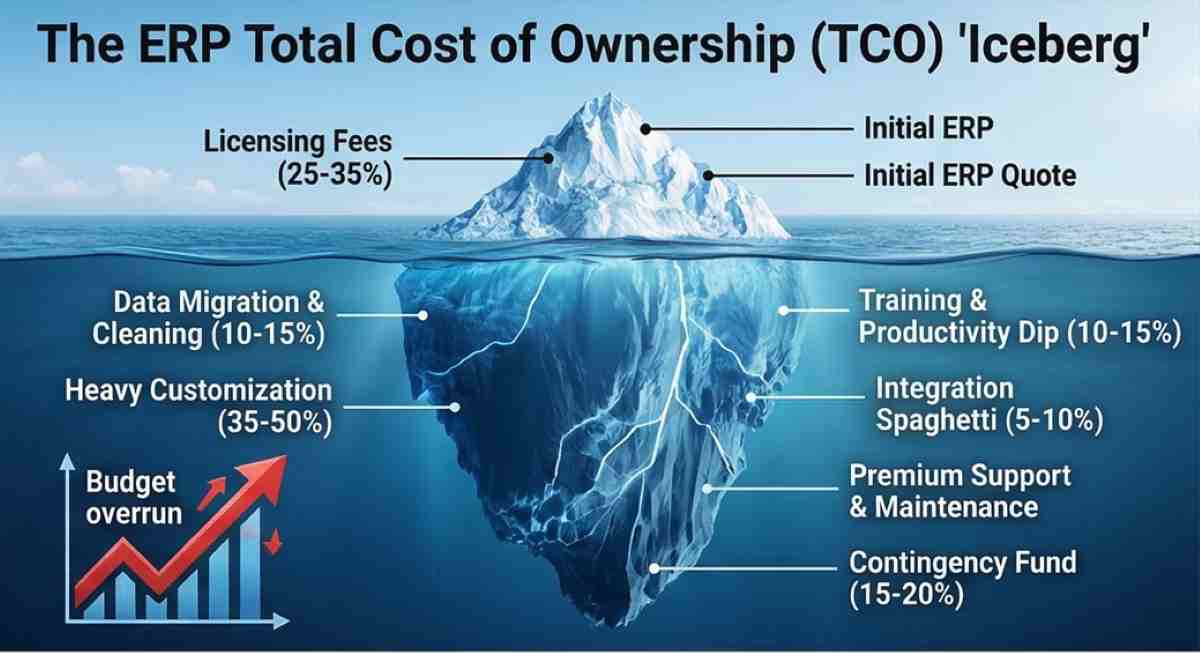
In the enterprise software world, the "sticker price" of an ERP is a dangerous fiction. Whether you are looking at a cloud-native SaaS solution or a heavy-duty on-premise deployment, the initial quote you receive from a sales rep is often just the tip of a very expensive iceberg. As a tech wizard who has sat through enough "go-live" post-mortems to know where the bodies are buried, I can tell you that the real financial damage happens in the layers beneath the licensing agreement.
In 2026, ERP platforms have become more complex, integrating AI, IoT, and real-time analytics. While these features add immense value, they also introduce new vectors for cost escalation that didn't exist five years ago. If you’re budgeting for a $100,000 implementation, you should probably be mentally prepared for $250,000.
Quick Navigation:
The Customization vs. Configuration Trap
Training and the "Productivity Dip"
Integration Spaghetti and API Overhead
Post-Go-Live Maintenance and "Success" Packages
1. The Data Migration Sinkhole
Data migration is where most ERP budgets go to die. Every company thinks their data is "mostly clean" until they try to map it to a new schema. You aren't just moving files; you are moving a decade of "creative" bookkeeping, inconsistent SKU naming conventions, and duplicate customer records.
The hidden cost here isn't just the software tool used for the transfer—it's the hundreds of consultant hours required to extract, transform, and load (ETL) that data. In 2026, industry benchmarks suggest that data migration can consume 15% to 20% of your total implementation budget. If you have eight or more years of historical data across multiple legacy systems, expect a migration bill upwards of $75,000 for a mid-market setup.
Technical Debt Alert: If you try to save money by "dumping" dirty data into the new system, you’ll pay for it ten times over in "system-of-record" errors and failed analytics reports six months later.
2. The Customization vs. Configuration Trap
Sales reps love to use the word "configurable." It sounds easy. But there is a sharp line between checking a box in the settings and writing custom code to make the ERP handle your unique "secret sauce" manufacturing process.
Configuration: Adjusting the software within its existing parameters (Free or low-cost).
Customization: Writing new code, altering the database schema, or building bespoke modules (Extremely expensive).
Heavy customization can add 700+ consultant hours to a project. At 2026 market rates of $150 to $400 per hour, a "small" customization to your inventory logic can easily balloon into a six-figure sub-project. Furthermore, every line of custom code is a future liability. When the ERP vendor pushes a mandatory cloud update, your custom code might break, leading to "regression testing" costs that recur every single quarter.
3. Training and the "Productivity Dip"
Most managers budget for the cost of the trainer, but they forget the opportunity cost of the trainees. If you are rolling out a new system to 100 employees and each requires 20 hours of training, you just lost 2,000 hours of core business productivity.
Beyond the initial "How to log in" sessions, there is the inevitable learning curve. For the first 3 to 6 months post-go-live, your team will be slower. They will make mistakes. They will spend time in internal support channels instead of closing deals or shipping products. This "Human Middleware" cost is rarely a line item on a vendor's quote, but it shows up clearly on your P&L as a dip in operational efficiency.
Pro Tip: Budget at least 15% of your total project spend specifically for Change Management. This isn't "soft" stuff; it's the insurance policy that ensures your $500k software doesn't become $500k of "shelfware" that nobody knows how to use.
4. Integration Spaghetti and API Overhead
In 2026, no ERP is an island. It needs to talk to your CRM, your e-commerce platform, your logistics provider, and your bank. While "pre-built connectors" exist, they are rarely "plug-and-play."
The hidden cost here is two-fold:
Development: Each integration typically costs between $3,000 and $15,000 to set up and test.
API Consumption: Many modern SaaS ERPs have moved to usage-based pricing. If your external systems are making thousands of API calls a day to sync inventory or pull reports, you might hit "overage" charges. Some unified API platforms now charge upwards of $65 per linked account per month. If you have a large ecosystem of vendors and partners, these "micro-transactions" can add $10,000+ to your annual OpEx.
5. Post-Go-Live Maintenance and "Success" Packages
Once the consultants leave and the "Go-Live" cake is eaten, the real costs of ownership begin.
Maintenance Fees: For on-premise systems, expect to pay 15% to 22% of the initial license fee annually for support and updates.
SaaS Escalation: Cloud vendors aren't immune to inflation. Many contracts include clauses that allow for 3% to 7% annual price hikes.
Premium Support: Basic support usually gets you a ticket system with a 24-hour response time. For mission-critical systems, you’ll likely need a "Premium" or "Platinum" support tier, which can add $20,000 to $50,000 to your annual bill.
ERP Total Cost of Ownership (TCO) Breakdown (Est. 2026)
| Cost Component | % of Total Budget | Estimated Range (Mid-Market) |
|---|---|---|
| Software Licenses/Subscriptions | 25% – 35% | $30,000 – $150,000 / yr |
| Implementation & Consulting | 35% – 50% | $50,000 – $300,000 |
| Data Migration & Cleaning | 10% – 15% | $15,000 – $75,000 |
| Integrations (3rd Party) | 5% – 10% | $10,000 – $50,000 |
| Training & Change Management | 10% – 15% | $15,000 – $60,000 |
| Contingency Fund (Buffer) | 15% – 20% | $30,000 – $90,000 |
Summary: How to Protect Your Budget
To avoid being the person who has to explain a 200% budget overrun to the board, follow these three rules:
The 2x Rule: Whatever the vendor quotes for implementation, double it in your internal budget for a realistic TCO.
Prioritize Clean Data: Start cleaning your legacy data now, months before you even pick a vendor.
Minimize Customization: Adopt the "Vanilla" version of the software wherever possible. If your process doesn't fit the software, ask if your process is actually the problem.
Frequently Asked Questions (FAQs)
1. Is it cheaper to build a custom ERP in-house in 2026?
Almost never. While it avoids licensing fees, the "hidden" cost of maintenance, security patching, and keeping up with evolving tax/compliance laws will far exceed the cost of a commercial subscription. You become a software company by accident, which distracts from your core business.
2. What is a "Contingency Fund" and do I really need 20%?
Yes. ERP projects are famous for "Scope Creep." As the project progresses, stakeholders will inevitably realize they "need" a feature that wasn't in the original RFP. Without a 20% buffer, every small change requires a new round of budget approvals, which can stall the project and increase consultant costs due to delays.
3. Does Cloud ERP actually save money compared to On-Premise?
It shifts the cost from CapEx (upfront) to OpEx (ongoing). While you save on server hardware and IT staff, the long-term subscription fees often surpass the cost of a perpetual license after 5 to 7 years. The real value of Cloud isn't "cheapness"—it's agility and the offloading of security/update risks to the vendor.
Advertisement