10 Best Active Directory Management Software Tools of 2026
Advertisement
10 Best Active Directory (AD) Management Software Tools
The modern identity landscape has shifted toward hybrid models, requiring perfect synchronization between legacy on-premises Active Directory and cloud-based Microsoft Entra ID. Today’s management platforms act as intelligent abstraction layers, allowing help desk technicians to execute bulk user provisioning, manage complex security groups, and run comprehensive compliance audits without needing direct domain administrator credentials. We have evaluated the industry leaders to rank the ten best Active Directory management and reporting tools built to optimize your IT operations.
1. SolarWinds Access Rights Manager (ARM)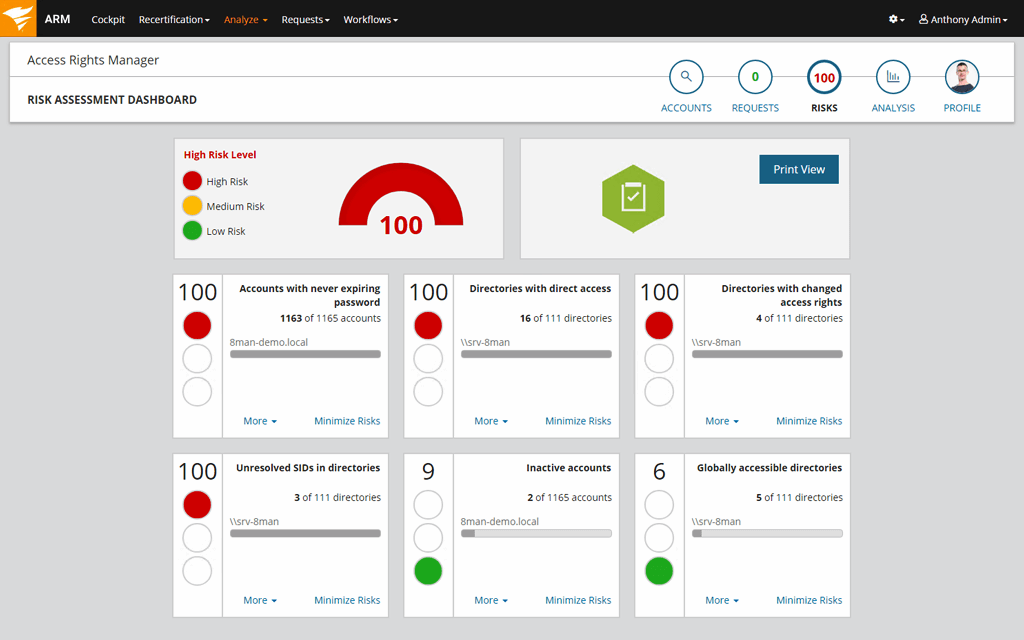
SolarWinds focuses heavily on high-end security and compliance auditing, designed specifically for security teams and network administrators who need to defend their directory architecture against internal and external risks.
- Visual Access Analysis: Delivers interactive, easy-to-read visualization maps displaying exactly which users hold permissions to sensitive network folders and file shares.
- Rapid User Deprovisioning: Terminate employee access privileges instantly across all connected systems during offboarding to prevent residual orphan account exposure.
- External Reference: Read granular system engineer evaluations and enterprise deployment reviews profiling SolarWinds ARM on G2.
2. Quest ActiveRoles
Quest ActiveRoles acts as a highly secure proxy layer between administrators and the directory database. It completely eliminates the need to grant dangerous, sweeping administrative credentials to intermediate help desk staff.
- Strict Virtual Administrative Boundaries: Technicians interact with a secure proxy interface, executing pre-approved operational commands while holding zero direct write permissions in the directory.
- Automated Data Validation: Enforces mandatory internal naming conventions and attribute formats automatically, keeping database string records clean and unified.
- Resilient Dynamic Groups: Dynamically adds or removes users from specific security groups based on changing department, title, or location attributes in real time.
3. Netwrix Auditor for Active Directory
Netwrix Auditor is an elite visibility platform crafted around answering the crucial security questions: who changed what configuration, when did it happen, and where did the modification occur?
- Continuous Change Tracking: Generates crisp visual event logs documenting every single change made to group policies, user permissions, and directory schemas.
- State-in-Time Snapshots: Allows system administrators to compare your active configuration layout against historical states to rapidly reverse unauthorized directory adjustments.
- Behavioral Anomaly Detection: Monitors for suspicious system behaviors, such as mass password modification attempts or sudden privilege escalation actions, to stop attacks in progress.
4. One Identity Manager
One Identity Manager focuses on broader identity governance and administration (IGA), blending complex on-premises legacy directory setups with decentralized cloud application infrastructures seamlessly.
- Unified Identity Lifecycle: Governs user digital identities and system access rules uniformly from initial hire, through departmental promotions, to final enterprise departure.
- Attestation Workflows: Automatically routes structured permission renewal requests to data owners, requiring them to verify access privileges regularly.
- Business-Friendly Portals: Includes a self-service catalog interface allowing standard workers to request application access without opening an IT ticket.
5. Softerra Adaxes
Softerra Adaxes stands out for its exceptional automation capabilities and remarkably sleek, customizable web console interface. It is built to transform complex multi-step identity tasks into background processes.
- Event-Driven Automation Loops: Program custom logic flows that trigger instantly on event states (e.g., "When a user is added to the Finance OU, automatically provision their cloud app licenses and trigger a welcome email").
- Self-Service Password Resets: Deploys a highly secure self-service portal equipped with multi-factor authentication checkpoints so users can resolve lockouts independently.
- Unified Multi-Domain Management: Control entirely distinct corporate forest architectures safely through a singular administrative control screen.
6. Cayosoft Administrator
Cayosoft is a modern, forward-looking hybrid specialist engineered precisely to orchestrate visibility and directory control across local Active Directory environments and Microsoft Entra ID deployments simultaneously.
- True Hybrid Rule Governance: Updates user properties across on-premises servers and cloud Azure tenants concurrently, avoiding synchronization delay errors.
- Instant Disaster Recovery: Features fine-grained rollback capabilities to immediately restore deleted objects or corrupted attributes without taking domain controllers offline.
- External Reference: Review deployment parameters and client onboarding evaluation metrics outlining enterprise directory utilities at Capterra.
7. Lepide Data Security Platform
Lepide centers its directory utility entirely around data security posture management, helping enterprise organizations trace hidden data paths and lock down group policy exposures.
- Group Policy Object (GPO) Auditing: Instantly alerts security administrators whenever a critical domain-wide policy configuration is added, removed, or altered.
- Privileged Account Oversight: Flags over-privileged accounts, inactive administrators, and expired user sessions to heavily reduce your internal cyber attack surface.
- Real-Time Threat Alerts: Sends immediate notification alerts directly to your SIEM (Security Information and Event Management) system when a data breach indicator triggers.
8. CJW_Software AD Reporter
For systems administrators who require deep data reporting capabilities above all else, AD Reporter delivers a highly specialized, lightweight engine configured to extract granular directory metrics.
- Expansive Custom Report Builder: Construct bespoke queries across thousands of raw directory attributes to pull precise network user inventory logs.
- Automated Export Scheduling: Compiles and dispatches critical network asset reports directly to executive security stakeholders on predefined calendar schedules.
- Lightweight Footprint: Avoids heavy agent software installations on your target domain controllers, fetching data safely via standard network query protocols.
9. IS Decisions UserLock
UserLock builds on top of baseline Active Directory access frameworks to introduce robust contextual access controls and rigorous login monitoring configurations across your infrastructure network.
- Context-Aware Session Rules: Restrict network authentication capabilities dynamically based on specific geographic locations, device models, or shift timing windows.
- Concurrent Session Restrictions: Stop users from sharing passwords by blocking a single account from logging into multiple physical workstation terminals simultaneously.
- Native MFA Extension: Embeds multi-factor authentication directly onto standard windows workstation desktop log-ins and remote desktop (RDP) sessions seamlessly.
10. Identity Automation RapidIdentity
RapidIdentity focuses heavily on identity and access management (IAM) deployment tracking across highly compliance-regulated verticals like education, government agencies, and healthcare operations.
- Automated Help Desk Routines: Empowers operations staff to initiate safe identity changes, group privilege additions, and domain configuration updates via clean dashboard views.
- Granular Lifecycle Tracking: Manages complex identity states from a user's initial operational onboarding phase up through complete institutional exit protocols.
- Robust Single Sign-On (SSO): Syncs Active Directory profiles with cloud SaaS dashboards to grant users instant, secure portal access via single-credential check-ins.
FAQs
What is the difference between Active Directory (AD) and Microsoft Entra ID?
On-premises Active Directory is a traditional network service structured around managing local hardware, physical computers, and local network resource access using protocols like Kerberos and LDAP. Microsoft Entra ID (formerly Azure Active Directory) is a cloud-based identity and access management service optimized to control access to web-first SaaS applications and cloud infrastructures using modern web protocols like SAML and OIDC.
Why is delegating permissions through a management tool safer than using native AD templates?
Native Microsoft tools often force you to assign broad, sweeping administrative permissions to tech support teams so they can modify user objects. Specialized management platforms act as a secure proxy layer. This allows help desk workers to execute specific actions—such as updating a department string or unlocking an account—while holding zero actual write privileges inside the live production database.
How do automated directory utilities prevent the accumulation of orphan accounts?
Orphan accounts are active profiles that belong to employees who have left the organization. Automated directory software handles this risk by tying into your HR platform. The moment an employee departure is recorded in your HR system, the tool triggers a structured deprovisioning workflow: disabling the AD user object, stripping their group privileges, reallocating their cloud licenses, and archiving their mailbox files instantly without manual IT intervention.
Advertisement