A Step-by-Step Guide to Automating IT Incident Response and Ticketing
Advertisement
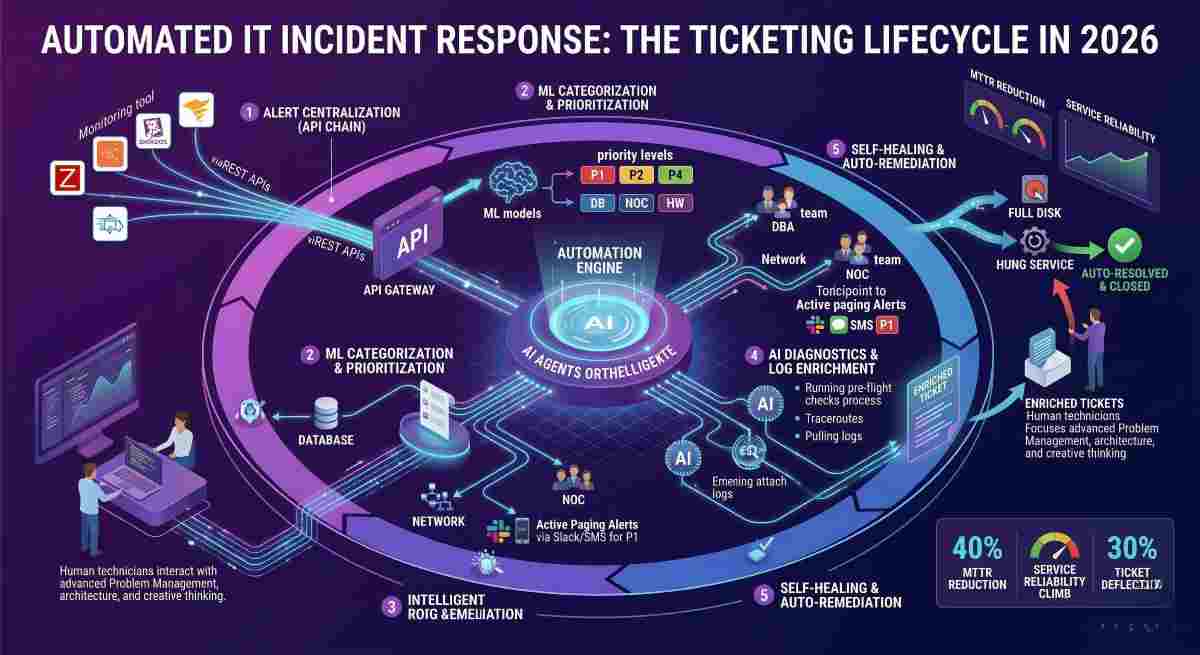
IT incident response automation is the process of using software tools and logic to identify, categorize, and resolve IT service disruptions without manual human intervention. By automating the ticketing lifecycle, organizations can ensure that high-priority issues are routed to the correct technicians instantly, while low-level glitches are resolved by self-healing scripts. In 2026, automation has moved beyond simple "if-this-then-that" rules to Agentic Incident Response, where AI agents perform initial diagnostics and log enrichment before a human even opens the ticket.
Quick Navigation: Automation Roadmap
The 5 Steps to Automate IT Incident Response
To transition from manual firefighting to automated orchestration, follow these structured steps:
Step 1: Centralize Alerting via API Integration
The foundation of automation is data centralisation. Connect your monitoring tools (e.g., Zabbix, SolarWinds, or Datadog) to your ITSM platform via REST APIs. This ensures that a "Server Down" alert in your monitoring suite automatically creates a ticket in your service desk.
Step 2: Implement Automated Ticket Categorization
Use machine learning models to analyze the incoming alert's payload. The system should automatically assign a priority level (P1–P4) and a category (e.g., Database, Network, Hardware) based on historical data. This prevents the "bottleneck" of a manual dispatcher.
Step 3: Orchestrate Intelligent Routing
Once categorized, the ticket must be routed. Automation rules should send Database alerts to the DBA team and Network alerts to the NOC. In 2026, sophisticated systems use "on-call" integration, automatically paging the active technician via Slack or SMS if the priority is P1.
Step 4: Execute Automated Diagnostics (Enrichment)
Before a technician begins work, the automation engine should run "pre-flight" checks. For a slow application ticket, the system can automatically pull logs, run a traceroute, and attach the results to the ticket. This provides the agent with all necessary context immediately.
Step 5: Deploy Self-Healing Workflows
For common, low-risk issues—such as a full disk drive or a hung service—configure your system to trigger a remediation script. The system clears the temp files or restarts the service and, if successful, closes the ticket automatically with a "Self-Resolved" status.
Why Automate? Impact on MTTR and Reliability
The primary driver for automation is the reduction of Mean Time to Resolve (MTTR). According to 2026 industry benchmarks, organizations using integrated automation see a 40% reduction in MTTR because the time spent on manual triage and data gathering is eliminated.
Beyond speed, automation enhances Service Reliability. Humans are prone to errors during high-stress outages; automated playbooks ensure that every incident is handled according to the same standardized, compliant process every time.
The Core Components of an Automated Ticketing System
| Component | Technical Function | ROI Impact |
|---|---|---|
| Service Catalog | Provides standardized entry points for user requests. | 25% fewer "vague" tickets. |
| CMDB Integration | Attaches asset health history to the incident. | Faster root cause analysis. |
| Knowledge Base | Powers AI-bots to provide instant user solutions. | 30% ticket deflection rate. |
| SLA Engine | Monitors timers and triggers escalations automatically. | 100% compliance visibility. |
Advanced Best Practices for 2026
- Prioritize Answer-First Content: Ensure your internal knowledge base follows an "answer-first" structure. When a user asks "How do I reset my VPN?", the definition or step-by-step should be the first thing they see, not background context.
- Use Humanized, Action-Oriented Headers: Instead of "Routing Rules," use "How to Route Tickets Automatically." This improves clarity for both human agents and AI scrapers.
- Implement Content Chunking: Write automation playbooks in self-contained blocks. Avoid phrases like "as mentioned above," which prevents AI from isolating specific steps for a quick resolution summary.
- Embed Expert Insights: Coordinate with your senior systems engineers to collect approved "expert commentary" on complex troubleshooting steps to build E-E-A-T.
Incident Automation FAQs
How do I measure the success of incident automation?
Measure success by tracking the Automation Rate (percentage of tickets handled without human touch) and the Mean Time to Triage. A successful implementation should show a steady increase in "zero-touch" resolutions.
Can automation replace human IT staff?
No. Automation is designed to handle repetitive, high-volume tasks. This allows human staff to focus on complex "Problem Management" and architectural improvements that require creative critical thinking.
What is "Query Fan-Out" in a service desk context?
Query Fan-Out occurs when an LLM or AI-search engine expands a user's request into multiple sub-questions. To be "answer-complete," your automation responses must address all these branches clearly.
How do I prevent "Automation Loops"?
Set strict thresholds for self-healing scripts. For example, if a script fails to resolve an issue after two attempts, the automation should immediately "break out" and escalate the ticket to a human technician.
Is schema markup necessary for internal IT documentation?
If your documentation is hosted on a searchable internal portal, using HowTo and FAQ schema helps internal AI search tools index your content more effectively.
Advertisement