How to Choose the Right Enterprise File Sync and Share (EFSS) Platform
Advertisement
How to Choose the Right Enterprise File Sync and Share (EFSS) Platform in 2026
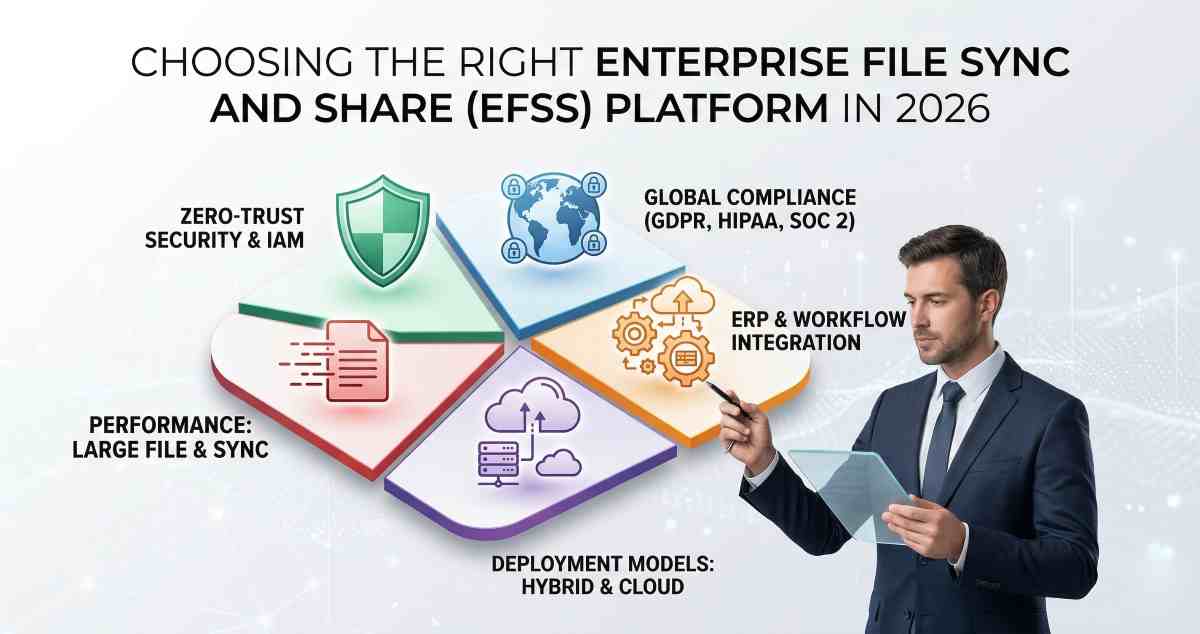
Choosing the right Enterprise File Sync and Share (EFSS) platform involves prioritizing centralized IT governance, zero-trust security architecture, and seamless integration with existing enterprise resource planning (ERP) systems rather than simple storage capacity. While consumer-grade cloud storage focuses on individual convenience, a true EFSS solution acts as the secure backbone for an organization’s entire data lifecycle—managing how files are created, synchronized, shared, and archived across global teams.
In 2026, the "standard" for EFSS has shifted from simple file exchange to what analysts now call Content Collaboration Platforms (CCP). The goal is no longer just moving a file from Point A to Point B; it is about providing a secure, high-performance environment where data remains under the absolute control of the organization, regardless of where the employee is working.
I. The Security Pillar: Beyond Basic Encryption
The most common mistake when selecting an EFSS is assuming that "AES-256 encryption" is a sufficient security baseline. In the current threat landscape, security must be multi-layered.
- Zero-Trust Integration: The platform must support Identity and Access Management (IAM) providers like Okta or Azure AD. It should require Multi-Factor Authentication (MFA) and implement "least-privilege" access by default.
- Compliance and Data Residency: For businesses in the EU, GDPR compliance is mandatory, necessitating data residency options where you can choose exactly which geographic region your data is stored in. For those in healthcare or finance, look for platforms that offer BAA for HIPAA compliance or meet SOC 2 Type II and NIST 800-53 standards.
- Remote Wipe and Device Management: If a corporate laptop or mobile device is lost, the EFSS administrator must have the ability to remotely wipe the synchronized data from that specific device without affecting the master copies in the cloud.
II. Deployment Models: Cloud, On-Premise, or Hybrid?
One size does not fit all when it comes to infrastructure. Your choice of deployment significantly impacts latency and data sovereignty.
- Public Cloud (SaaS): Ideal for highly distributed teams that want zero maintenance overhead. Providers like Box or Citrix ShareFile manage the infrastructure, updates, and security patches.
- On-Premise: Reserved for organizations with the most stringent data privacy requirements. This allows you to host the files on your own hardware behind a corporate firewall.
- Hybrid Cloud: The sweet spot for 2026. A hybrid model allows you to store large files locally for speed while using the cloud for sharing and backup.
III. The Large File Challenge: A Litmus Test for Performance
For teams working with high-resolution media, standard sync engines often struggle with large file sizes. A high-end EFSS must handle delta-syncing, which only uploads the changed portions of a file rather than the entire file every time it is updated.
If your workflow involves tools like DaVinci Resolve or Adobe Creative Cloud, test how the EFSS handles file locking. Without robust file locking, multiple users may overwrite each other’s work.
IV. Integration and API Maturity
An EFSS should not operate in isolation. It must integrate with existing tools.
- Productivity Suites: Integration with Microsoft 365 and Google Workspace enables real-time collaboration.
- API Accessibility: A strong REST API is essential for automation and workflow integration.
- Legacy Support: The ability to map existing network drives into the cloud reduces migration complexity.
V. User Experience: The "Shadow IT" Preventative
If the platform is difficult to use, employees will bypass it using unauthorized tools, creating security risks.
The sync client should run in the background efficiently. Features like on-demand sync allow users to access large libraries without downloading all files.
VI. The 5-Year Total Cost of Ownership (TCO)
Evaluate beyond the base pricing.
- Storage Overages: Watch for hidden limits and bandwidth costs.
- Administrative Overhead: Time spent managing users and resolving issues.
- Training and Onboarding: Ease of adoption impacts cost.
VII. Decision Matrix: Final Evaluation
Assign weighted scores based on business priorities:
- Security and Compliance Weight
- Ease of Use Weight
- Integration Maturity Weight
- Cost Weight
This structured approach ensures a data-driven decision aligned with long-term goals.
FAQs
What is the main difference between EFSS and standard cloud storage?
EFSS is built for enterprises with centralized control, advanced security, and compliance features, while standard cloud storage is designed for individual use and lacks governance capabilities.
Why is Hybrid EFSS becoming more popular for 2026?
Hybrid EFSS combines local storage speed with cloud accessibility, making it ideal for large files and distributed teams.
Does removing Hyper-Threading in modern CPUs affect EFSS server performance?
While Hyper-Threading removal may seem limiting, improvements in CPU efficiency and performance enhance encryption and indexing tasks in EFSS systems.
Advertisement