Top Enterprise WiFi Heat Map Software for Wireless Network Planning
Advertisement
Top Enterprise WiFi Heat Map Software for Wireless Network Planning
Designing and maintaining high-density WLAN environments requires rigorous adherence to RF telemetry standards, such as those governed by the IEEE 802.11 Working Group. Modern site survey tools ingest CAD floor plans and material attenuation factors to generate 2D/3D predictive propagation models, allowing systems architects to ensure seamless roaming protocols and capacity thresholds before physical hardware deployment.
1. Site24x7
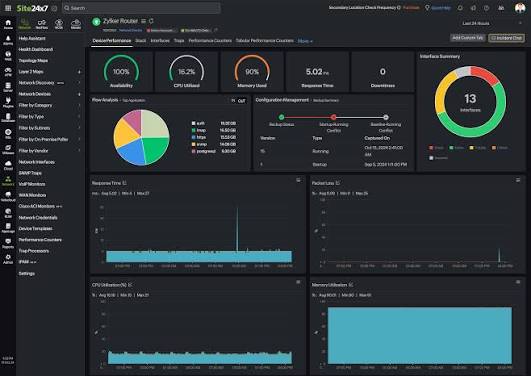
Site24x7 integrates wireless performance monitoring into its broader cloud-based infrastructure telemetry platform. It correlates signal propagation data, bandwidth consumption, and latency metrics across distributed multi-vendor access point deployments.
- Deployment Type: Cloud-native SaaS platform leveraging lightweight, cross-platform remote poller nodes across hybrid environments.
- APIs & Integration: RESTful API engine supporting dynamic alerting, webhook dispatch, and automated incident management in ITIL workflows.
- Analytics & ML: Machine learning models for baseline performance correlation, enabling root-cause isolation across RF and underlying wired backhaul infrastructure.
2. SolarWinds WiFi Heatmaps with NPM
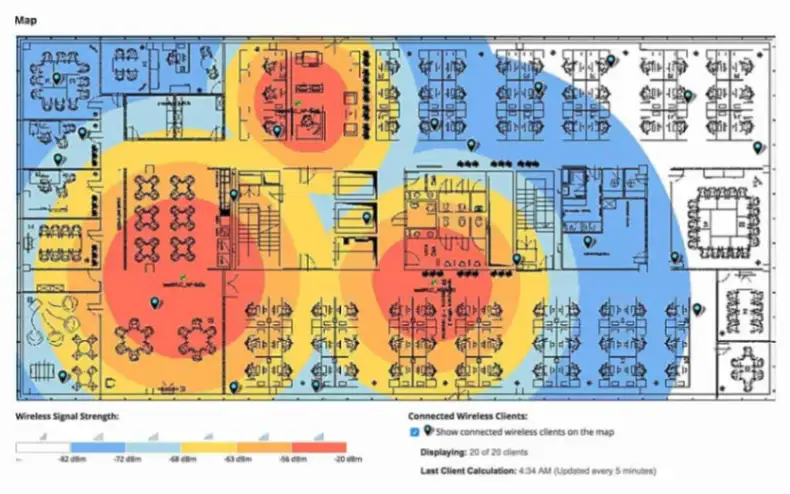
SolarWinds Network Performance Monitor generates dynamic wireless heat maps by polling Cisco and other enterprise WLAN controllers. It automatically computes signal attenuation and client physical locations down to the foot by triangulating signal vectors from surrounding access points.
- Deployment Type: On-premises enterprise platform deployed on Windows Server architecture with SQL Server backend integration.
- Hardware & Controller Support: Deep SNMP and API integration with enterprise WLAN controllers including Cisco, Aruba, and Ruckus systems.
- Location Tracking APIs: Integrated client-location tracking engines that map connected mobile endpoints directly onto architectural CAD overlays in real time.
3. Ekahau WiFi Heatmaps
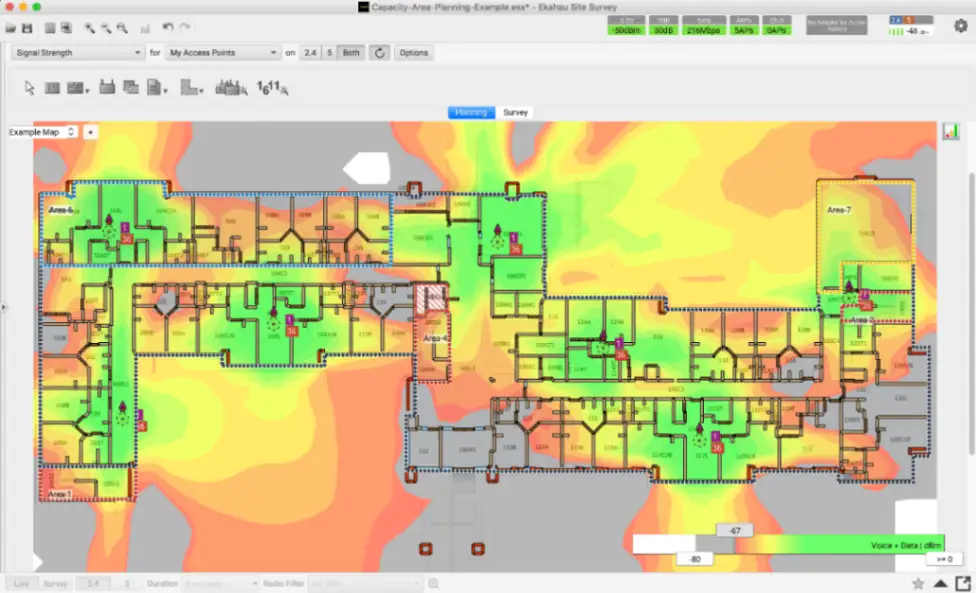
Ekahau represents the industry standard for predictive RF modeling and high-precision site surveys. It utilizes custom multi-radio survey hardware to capture 2.4 GHz, 5 GHz, and 6 GHz spectrum metrics for rapid network optimization.
- Deployment Type: Hybrid system consisting of desktop modeling software paired with dedicated mobile sidekick hardware and cloud sync capabilities.
- Survey Modes: Supports passive, active, and spectrum analysis walk-through surveys alongside CAD-based 3D predictive simulation algorithms.
- APIs & Automation: Automated access point placement optimization engine that calculates channel assignments and power levels based on wall attenuation specs.
4. VisiWave Site Survey
VisiWave Site Survey is designed for large-scale indoor and outdoor wireless deployments requiring granular spatial data collection. It supports GPS-assisted tracking to map RF propagation over expansive geographic campuses and complex facilities.
- Deployment Type: Windows-native workstation application engineered for local field survey data collection and offline analysis.
- 3D & GPS Integration: Native GPS receiver coupling for real-time outdoor georeferenced data gathering and interactive 3D Google Earth KMZ renderings.
- Data Export APIs: Flexible data extraction formats allowing custom HTML, PDF, and raw spatial telemetry exports for external reporting engines.
5. AirMagnet Survey Pro
AirMagnet Survey Pro by NetAlly provides enterprise-grade wireless network planning and validation for advanced Wi-Fi 6 and 6E standards. It allows engineers to model material wall attenuation, simulate channel overlap, and measure actual PHY data rates during active site walks.
- Deployment Type: On-premises Windows software suite utilizing specialized Wi-Fi packet capture network adapters.
- Wi-Fi 6/6E Modeling: Advanced simulation algorithms specifically tuned for 802.11ax 6 GHz channel allocation, OFDMA efficiency, and high-density capacity planning.
- Automation & Simulation: Integrated virtual AP placement tool that models varying antenna tilt patterns, transmit powers, and physical building barriers.
6. Acrylic Wi-Fi Heatmaps
Acrylic Wi-Fi Heatmaps offers an accessible solution for indoor and outdoor RF spectrum analysis across Windows environments. It builds detailed 2D and 3D signal coverage maps while simultaneously evaluating co-channel interference and network latency parameters.
- Deployment Type: Desktop application supporting passive capture via standard NDIS drivers and active capture via dedicated airpcap hardware.
- Report Generation: Generates 15 distinct high-resolution heatmap visualizers with direct export options to Microsoft Word, Excel, and KMZ formats.
- Diagnostic Features: Automatic AP recommendation engine that calculates optimal physical placement and channel distribution to reduce RF contention.
7. NetSpot
NetSpot is a versatile, multi-platform wireless survey tool tailored for both entry-level network mapping and enterprise site troubleshooting. It features streamlined survey workflows for uploading floor plans, executing passive walk-through surveys, and visualizing signal leakage.
- Deployment Type: Multi-platform native client supporting macOS, Windows, Android, and iOS surveying endpoints.
- Survey Modes: Dual-mode architecture offering Inspector Mode for instant spot-checking and Survey Mode for comprehensive floorplan heatmapping.
- Visualization Analytics: Interactive color-coded overlays measuring Signal-to-Noise Ratio (SNR), noise level contours, and access point overlap zones.
Frequently Asked Questions
What is the difference between an active and passive WiFi site survey?
A passive survey listens for beacon and probe response frames to measure RSSI and noise without connecting to the WLAN, whereas an active survey associates a client card to an AP to measure actual PHY data rates, packet loss, and round-trip latency.
How do predictive WiFi heat maps calculate signal propagation?
Predictive software utilizes mathematical RF propagation models (such as indoor attenuation algorithms) combined with user-defined floorplan wall materials (concrete, drywall, glass) to simulate 2.4 GHz, 5 GHz, and 6 GHz coverage prior to physical AP installation.
Why is 6 GHz Wi-Fi 6E heatmapping different from legacy 2.4 GHz/5 GHz mapping?
The 6 GHz band experiences higher free-space path loss and greater attenuation through solid obstacles compared to 2.4/5 GHz bands, requiring survey tools to update propagation models and account for distinct power limits (LPI vs. AFC-controlled Standard Power APs).
Advertisement